ZBrushCentral

Local Subdivision Problem

Okay here’s my problem and I’m hoping someone can help me. I’m trying to do a local subdivision, the image below shows the part I want to subdivide which is the unmasked part.
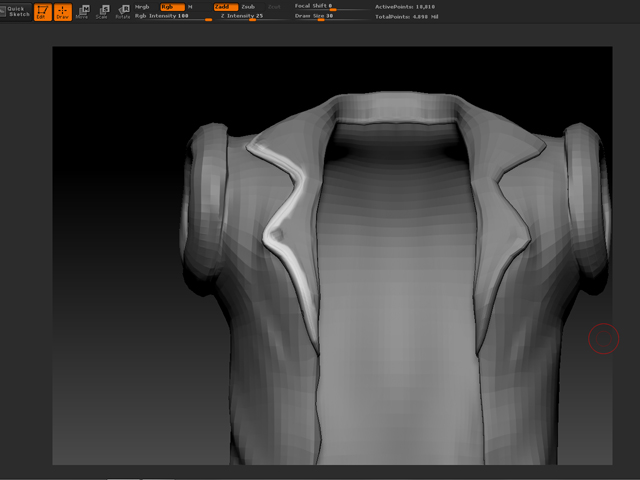
wqe543er.jpg

Anyone have an idea what the problem is?

When I do the local subdivion once…it doesn’t show any artifacts. But when I do it twice it shows up. I need to do it twice to get the resolution I need in that area. Any help would be greatly appreciated.

Attachments
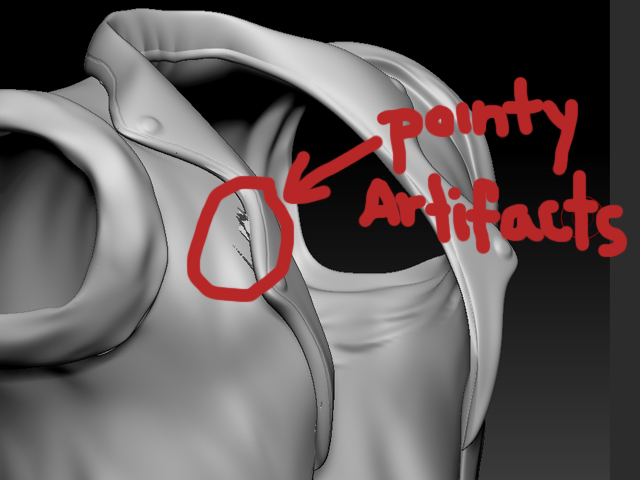
t3t3rg.jpg

Ok, you’ve shown what you’re trying to do, but you’ve said nothing about what the problem is that you’re encountering…

sorry I was having problems with the uploading part. Its good now

It may be due to the scale of the model. What does the model look like in the Tool>Preview window? If it’s really tiny or really huge you may need to resize the model as a whole (using Tool>Deformation>Unify or Tool>Deformation>Size) before you try locally subdividing.

[ew879gh3unrgin.jpg](javascript:zb_insimg(‘202632’,‘ew879gh3unrgin.jpg’,1,0))

I did the Unify and it auto scaled it…but now my zbrush just crashes when I do the second local subdivision in that area…Should I keep trying?

Okay it finally didn’t crashed but there’s still the problem…

[542t2fr32f2ef2.jpg](javascript:zb_insimg(‘202633’,‘542t2fr32f2ef2.jpg’,1,0))

I hope you reply soon aurick!

I don’t know why this is happening, then.

Instead of using local subdivision (which creates triangles at the edges that smooth differently from the rest of the model) you might consider using HD sculpting. This will let you get a higher polygon count.

I don’t have experience with hd sculpting but ill try to do that. Thanks.