ZBrushCentral

Load tool problem

OK, very new to ZBrush, and I’m working my way through the “practical guide” armour tutorial. I managed to figure out how to save an object in the tools menu, and saved my tool a few times in two sessions. When I opened the tool menu and clicked load tool, my armour test pops up fine. The first day.

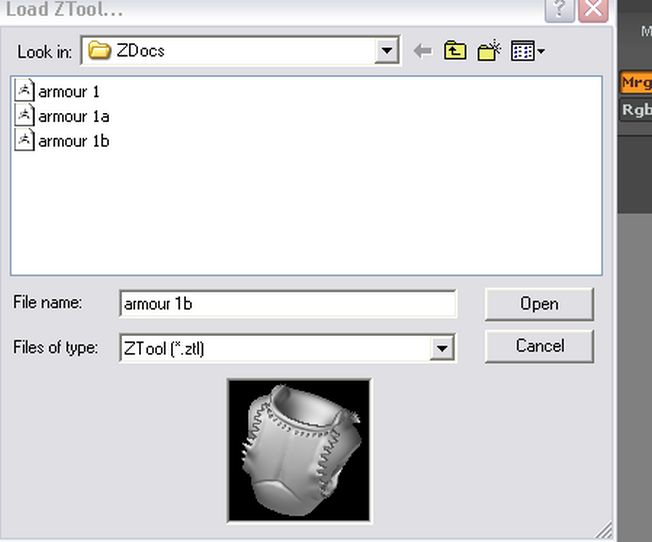
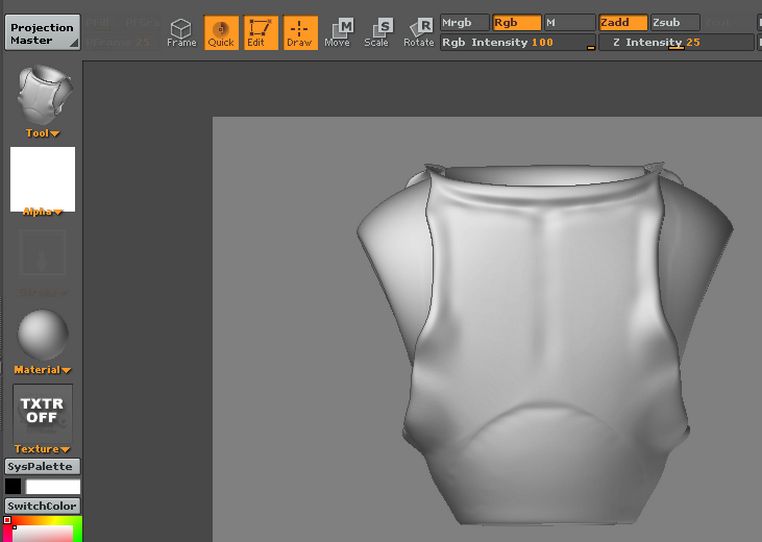
So yesterday I open the file, do some edits, save the file again with a new name(which worked fine yesterday). When I open it after this, the tool image looks right in the preview, but when it loads it looks like it did before the edits.

I’m sure I’m doing something really stupid, but can anyone take pity on me? I’ve attached the “Load tool” previews of armour 1 and 1b - as you can see they are quite different. The third image is how both of them show up when I draw them on the canvas.

Thank you for helping me out in my first post

D’ArcyPic45.jpg

Attachments

Pic44.jpg

Pic46.jpg

…with something like Armour_1a
Armour_1b
Without Space ? Else it’s a very curious problem :confused:
You reload on a new session ?

Welcome to the addiction :cool:

i know this is gonna sound silly…

but just because a tool is loaded doesn’t always mean its the one chosen in the palette when you draw.

make sure when you hover your cursor over the little thumbnail it has the correct name before you draw

Hi guys, thanks for getting back to me. I don’t know what’s going on. I opened one and made changes and saved it, and it came out fine when I reopened it. I think I may have to just accept that I lost the changes I made the other day and try to recreate them :frowning:

D.

Also, be sure to save your multi-resolution models at subdivision level 1. This helps avoid several problems that can happen with loading. Of course, after you load the tool later you will have to go back up to the highest level to see those details. :wink:

Hi

Thanks for replying. Of course, since I have no idea what you are talking about, it’s RTFM time again ! :slight_smile: I’ll figure this out at some point, I’m sure…

D.