ZBrushCentral

Little Disp Map

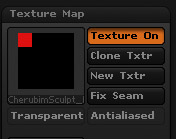
I have a sneaky feeling that this has been discussed over and over again but my searches did not exactly match my problem. When I created my disp map it created it in the upper left corner of the 2k map. I have not touched this file for a while and it worked before, so I am not sure what I did to get this particular result. I did see a post on using a morph target to re-import the uv’s, is this the solution? My screen grab is from the “New texture map from UV’s”, but the idea/problem is the same, it just takes forever to get the disp map out. Thanks for the help.

Attachments
DispMapProb.jpg

It looks like your UV mapping only makes use of that upper corner. So it wouldn’t matter if your texture was 1024 or 4096, you’d still only see that portion of it used.

You can go to level 1 and assign new UV’s using ZBrush. Or you can go to level 1 and import a new version of the model with better UV’s (but make sure it still has the same point order).

Thank you very much, I know a lot of people are asking questions about disp maps and I appreciate you taking time to answer my question. I saw a thread where you explained how to use a morph target to get the UV’s back into ZB. I’ll give that a try. Once again, Thanks.