Hello. I have an issue and I hope that someone could help me. The problem is relative to lighting rendering. The shadow works, but if I try to change the max distance in the BPR Shadow (even if I put a value of 0.001) all the casting shadow disappear in the rendering, on the model and on the floor too. Therefor the intensity on the light shadow menu in the light palette seems not to work. Could please someone help me? I want to add the two lights I’m using seems linked, I mean, when I change some setting of the first light, settings change even for the second light… damn . Please someone could try to let me understand. Thank you so much.
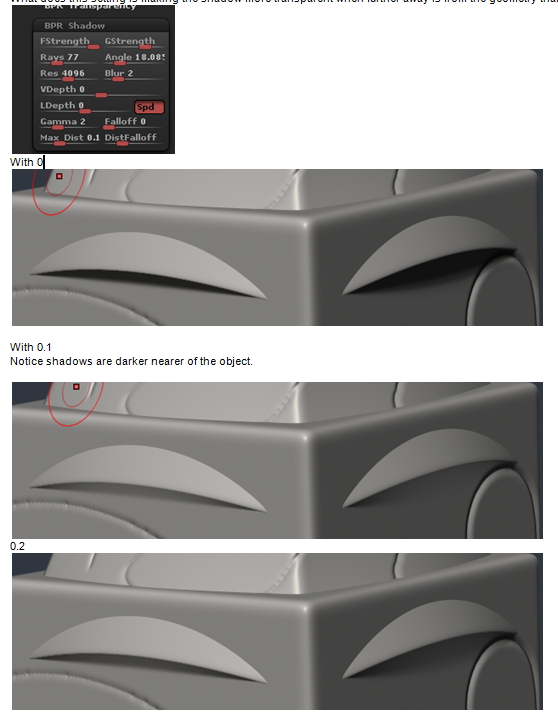
It seems that the description of the interactive help text when hovering over the button contradicts what it does. With higher number the range of the shadow is longer and not shorter. 0 value is no active, this means a long range. Any small value over 0 means very short (invisible) and growing gradually as you increase the number.
What does this setting is making the shadow more transparent when further away is from the geometry that originates it.
The values of the render section affect all lights.
thank you so much atlea. It works on the shadow casting on the model, but on the floor they disappear completely. I tried a lot of settings of max distance and its falloff but the cast shadow on the floor disappear. maybe there’s some problem in my model, cause with a sphere it works, and even the setting lights give me some issues. If I change the intensity of light A, changes the intensity of light B too.
Thank you again.