Hi again. Ok- we’ve made some tests. 
It turns out that once you’ve pressed the SUV and reUV button in the geometry palette, you cannot get back to your original uv’s by recalculating them via ‘ReUV’ with ‘SUV’ turned off. I tried a simple test by importing two .obj’s into Maya- the original and then the same mesh which had it’s uv’s smoothed via ‘ReUV’ and then recalculated again unsmoothed. A quick check in the uv editor shows that the uvs are obviously different.
I went further with the test and realised that each time I calculated back and forth between SUV on and SUV off, my uvs were becoming more and more removed from the original uvs.
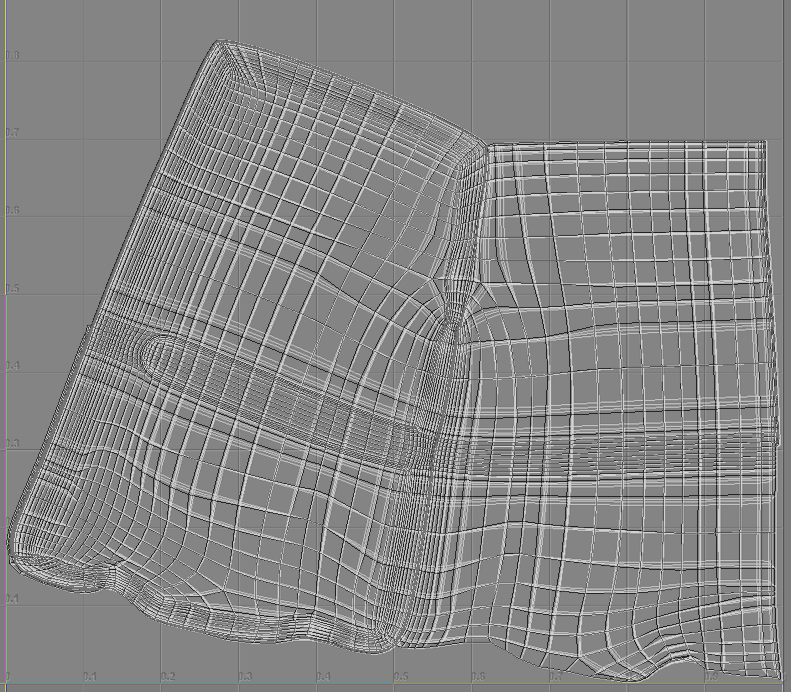
My assumption about the ‘SUV’ and ‘reUV’ buttons were that they acted as a kind of toggle, between smoothed and original UVs. But this isn’t so. Actually, everytime you enable ‘SUV’ and hit ‘ReUV’, you will get additional smoothing on your uvs. This has tripped us up badly- as we were working on our original mesh and updating our texture maps, recalculating for smoothed UVs on export, and wondering why our texture maps weren’t aligned.
Some more tests…
When exporting vector displacment maps, we were able to generate four slightly different maps under the following settings:
*Smooth uvs checked on in the vector displacement options (prior to any SUV recalculation in geometry palette)
Smooth uvs checked on in the vector displacement options (SUV recalculated in geometry palette)
smooth uvs unchecked in the vector displacement options (SUV recalculated in geometry palette)
*Smooth uvs checked on in the vector displacement options (unsmooth uvs recalculated in geometry palette)
What was confusing me:
1 - For the 1st and 4th settings, I would have assumed that the two outputted vector maps would have been identical- as recalculating unsmoothed uvs via ‘ReUV’ is supposed(?) to return you to your original uvs. But this isn’t true, confirmed by this test and my other basic tests described above.
2 - For the 1st and 2nd settings, I would have expected that hitting ‘ReUV’ with ‘SUV’ on would produce an identical map to the first map (you can’t smooth twice right? Untrue, zbrush applies more smoothing to your base uvs).
So basically we’ve discovered a number of things.
Firstly ‘reUV’ doesn’t do what it says on the tin- “zbrush will reapply the original uv’s before they were smoothed” - as I said, this has been a huge trip up for us, as we were always using the same exported mesh in Maya and applying new maps out of zbrush to it.
Secondly, zbrush just keeps on smoothing uvs everytime you recalculate for ‘SUV’. Smoothing uvs in the vector displacement palette and smoothing uvs additionally via ‘SUV’/‘ReUV’ has an effect on the outputted texture map. It’s double smoothed. Or something. Another layer of confusion.
Of course, the problem goes away as soon as you export out an updated base mesh with the altered uvs (or, I guess- reimport uvs from the original base mesh), along with your current textures. But it’s been quite a painful process in realising this. We chased many different theories, tried all kinds of ‘voodoo’, simply in order to export our maps (kinda the whole point of zbrush to my mind). Very frustrating, to say the least. I won’t go any further…  small_orange_diamond:)
Ok, thanks for listening


 small_orange_diamond:)