ZBrushCentral

Learning Zbrush

I want to model more Characters, I mainly use Cinema 4d, and i only do this as a hobby, i have been watching the Maa-Haa tut, I am not going for an exact match for the model in the tutorial.
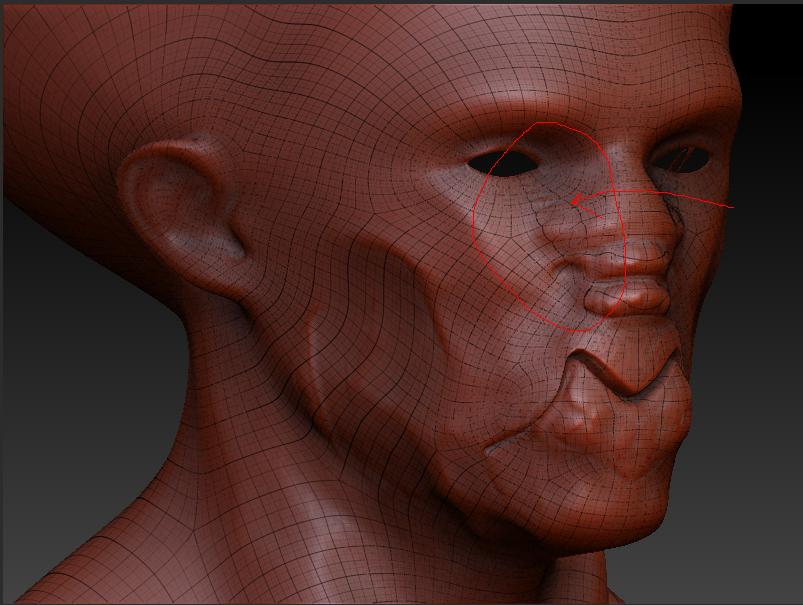
Below is an image with an area that concerns me circled in red it’s to do with the poly flow it doesn’t look right but i could be wrong could you guys give me some advice please is it ok is it wrong etc.

Simon
1c.JPG

Zbrush can be rather particular about topology. To get smooth, predictable results when sculpting, you need to have a mesh that is all quads, and the poles should not have more than 5-6 edges coming into them.

It looks like the area in question does not have clean edgeloops, so that is why it is kinking up.

The thing is i created the base mesh in Cinema 4d, i’m pretty sure there were all quads, no tris etc it’s when i sculpted it in Zbrush this has happened, can this happen in Zbrush, I dont know, i’ll try again or is there a way of fixing it.

Simon

If you go to subdivision level 1 you will clearly see a line of triangles there. I don’t know what caused C4D to export those quads as triangles, but there is no doubt when looking at the heaviest lines and the way that the model smoothed when divided that there are triangles.