ZBrushCentral

Lasso masking is not 100% Intensity

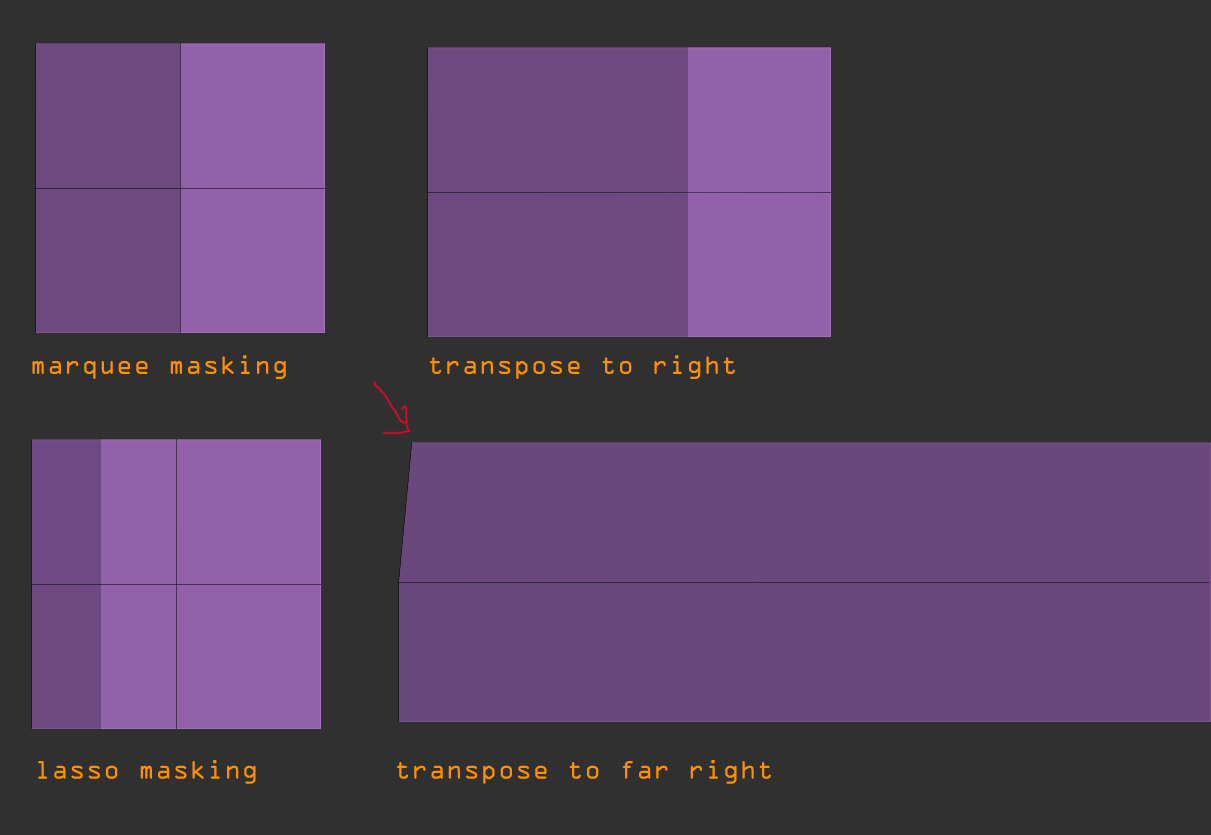
Previously during high res transposing using the Lasso for masking I and a few others have noticed artifacts.
Lately I’ve been working on low poly models, made within zbrush, i’ve noticed over and over again that when using the lasso tool for masking it does not lay down a mask at 100% intensity as the Marquee masking does. This does not happen all the time but more often than not.
I’ve tried these things to rememdy this:

  1. unify and/or sizing to be smaller in preview window.
  2. both types of masking, with or without alpha through the hold/release CTRL function.
  3. Mask Blending at 100

The only solution i found is to reapply the lasso over the selected vertices a few times, this will work for really low poly as in my example but during high res models this is not really an option because you cannot select exactly the same parts (without using a record stroke, replay stroke)

Attachments
ZBrush-Document.jpg

Hi spaceboy412,

It would appear that most things in Zbrush are not 100%. Clarity presents itself when you actually try and do something contructive with the software.

I’m sorry that I can’t help you with your problem. This program seems to rely on doing things in a consecutive order, and it’s limited.

thanks i just found one solution for the masking of low level polys on the vertice level, just hit the Mask sharpen button. but as i said its problematic in high res models. i don’t believe there is an accurate solution but that this is actually a small bug that i’m hoping to make aware to the appropriate people hoping that it will be fixed next time around.

Hi
I found that the lassoo works best if you apply it multiple times and then mostly the mask is sort of 100%

Try it and see if it works - it has done for me many times

kasperle, if you had read my first post you would see that i already know this and that i had said that for low poly its not an issue but when doing so on a high res model its near impossible to get the lasso to repeat multiple times without using the repeat stroke function, not to mention that you don’t acutallly know if the mask is 100% which could lead to artifacting, its something that needs to be fixed, that is my point.

That is interestingand I too hope thez fix this.
Good luck

Another option:

Instead of lasso masking, do a lasso selection. The Ctrl+Click on the canvas to mask the visible polygons. That will be 100%

that sounds good thanx