ZBrushCentral

Keeping more that 1 subpalette open at once?? [Answered]

Ok…I’m a noob, I’ll admit it. :slight_smile:

I have watched many tutorials online and in the videos the instructor always has multiple subpalettes open at once… but when I am using Zbrush, whenever I click on a secondary subpallette, it closes the initial one!

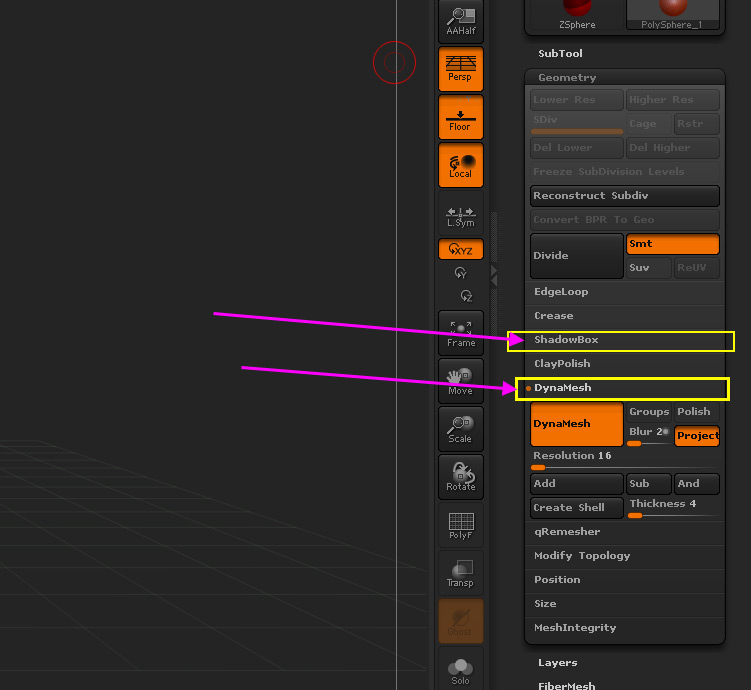
For example, when I click on DynaMesh… it opens. But then when I click on ShadowBox (above DynaMesh), it closes “DynaMesh”. But in all of the videos I have watched… they have BOTH open at once. (see image)

So… I must have changed a PREF or SETTING at some point.

Anyways… its frustrating the %^!$! out of me… so surely someone knows how to make the subpalettes ‘sticky’.

Thanks in advance!
DJ

Attachments
Untitled-1.jpg

Turn off Preferences>Interface>Palettes>Open One Subpalette and then save the configuration (Shift+Ctrl+i). Or, if you only want to open more than one sub-palette now and again, Shift+click the sub-palette title.

Thank you! :slight_smile:
-dj

Hi Marcus

Unless I’m doing something wrong, that solution only works for Subpalettes, not the choices WITHIN subpalettes. For example, that lets me keep Subtools and Geometry open at the same time, but it doesn’t let me keep Dynamesh and QRemesher open at the same time. Only Shift Clicking will do that. Is there some preference that will let me ALWAYS keep two Sub-subpalettes open at the same time?

Thanks!
Will

In ‘Preferences>Interface>UI Groups’, turn off ‘AutoClose UI Groups’

Thanks Zber2!!

Now THAT’s what I’m talking about! Your help is much appreciated. And not just by me. You are on these boards helping people every day, and that is extremely generous. Thanks!

Will

Yes, THANKS Zber2!!!

:slight_smile:

No problem guy’s! :slight_smile:

Thanks zber2! :slight_smile: