ZBrushCentral

Is there a brush that...

…removes editing from higher subdiv levels ONLY.

One example: I pose a hi-res mesh, using the lowest subdiv. Often displacement (i.e. editing) of higher res vertices just doesn’t work in the
resulting pose, and I’d like to selectively erase ONLY the higher res edits
from an area, effectively leaving the higher res mesh as if it had just been
subdivided from the low res mesh with no editing

The smooth brush doesn’t work in this situation as it affects all levels of the
mesh. I’ve tried a low-res morph target, but couldn’t get that to work either.

Any ideas folks?

G.

Edit:

Another example: Repairing ‘damage’ from using ‘projection’ to try and recover high res detail after retopo’ (Always some repair work needed
in my experience).
If I am understanding you right, you can go to the highest sublevel make a morph with all levels turned off. Then turn them back on. Then you can correct anything in the lower levels that is wrong with the morph brush.

Sorry if I misunderstood your question.

Erm. Thanks Codeman, but I think that’s the other way around.
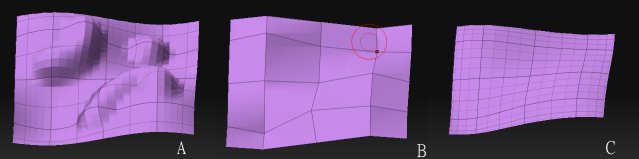
Its tricky to describe. Time for some pics…

[LayerSmooth.jpg]

I have (A), with hi-res detail. (B) is the low-res ‘base’ mesh.

I want to ‘smooth’ (A) to ©, that is, without affecting the low res (B).

Kind of like smooth, but with subdivs below a certain level locked out.

Any ideas folks? IS there a way to do this with a morph target?

G.

Doh!

OK. I just tried this with a low-res morph target and it seemed to work.

To expand on that:

A) Select the subdiv level you DON’T want to ‘smooth’, store a Morph Target.

B) Go up to hi res and use the smooth brush (set high)

C) Go down to the level you stored the MT, and switch.

Don’t know what went wrong the first time I tried. Guess I’m just tired.

Sorry 'bout that.

G.

The only way I can think of is to make a morph target at the high level, then delete all but the low level, rebuil your subdivisions with no smoothing, then use the morph brush to put back the parts you didn’t want reverted. It’s a little backwards, but it should work.

I also find that if you do a lot of pushing and pulling at level one everything else reverts for the polygons I tweak so that might work if it’s only small areas you want to match the lowest level mesh. Again, make sure you have smoothing off, though.

Thanks neurogenesis. It’s solved (see above). G.