ZBrushCentral

Is it still best to build a base mesh for heads you want to rig?

Hi all,
I’m working on a personal short film this year. My main speciality is animation, but for the purpose of this film, I’m taking on all aspects of the work. I do have some experience/competency in modelling in Maya and ZBrush - but not enough to figure out the following for myself:

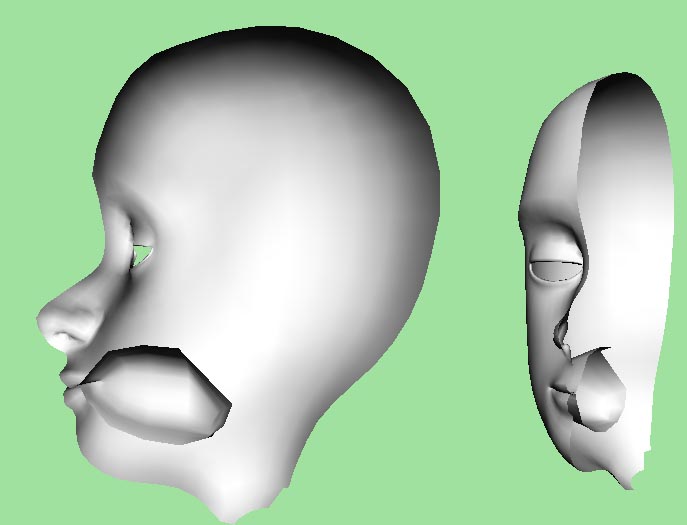
Basically because the head must be rigged, the mouth can’t simply be a short indentation masked by teeth. Rather, it has to be almost like a big hole inside the head. Here’s a picture to illustrate:

Ideally I’d like to do this all in ZBrush since I’m not well accustomed to making heads with good topology in Maya. But I’m not sure how well this would work out (in ZBrush), because I can see a problem arising in that the inside of the mouth will have a more sparse polygon density - which may not translate well when I decimate the whole mesh to a manageable polygon count.

Please advise on what best to do :slight_smile:

Attachments

mouthhole.jpg

The route you are going is fine. You could also do the same thing inside of Zbrush. With R2 coming out…sometime today you could actually do this all up with a dynamesh and also keep decent detail inside of the mouth as well. You can do it with the tools we have available as well, but it will require a retopo once you push in the mouth. Or you could use group loops go achieve the same result. Basically, there is no “right” way to do this. The right way for you is what you feel most comfortable doing, and how you can achieve the highest level of quality in the fastest manner that is acceptable to you.

Hope this helps.

Thanks for the response :smiley:

Hey again
So I have 4R2 now. But problem is still present.

What I’m doing is using a base mesh that has a hole for mouth and small gaps between the eyelids.
The problem is that when I turn Dynamesh on, the gaps merge. I don’t know how to stop this from happening, or how to remake the gaps.
Also I have a problem with the topology tool; it doesn’t snap to points at intersections. Is there an option I have to check?

Anyone?