ZBrushCentral

Insert mesh

Hi
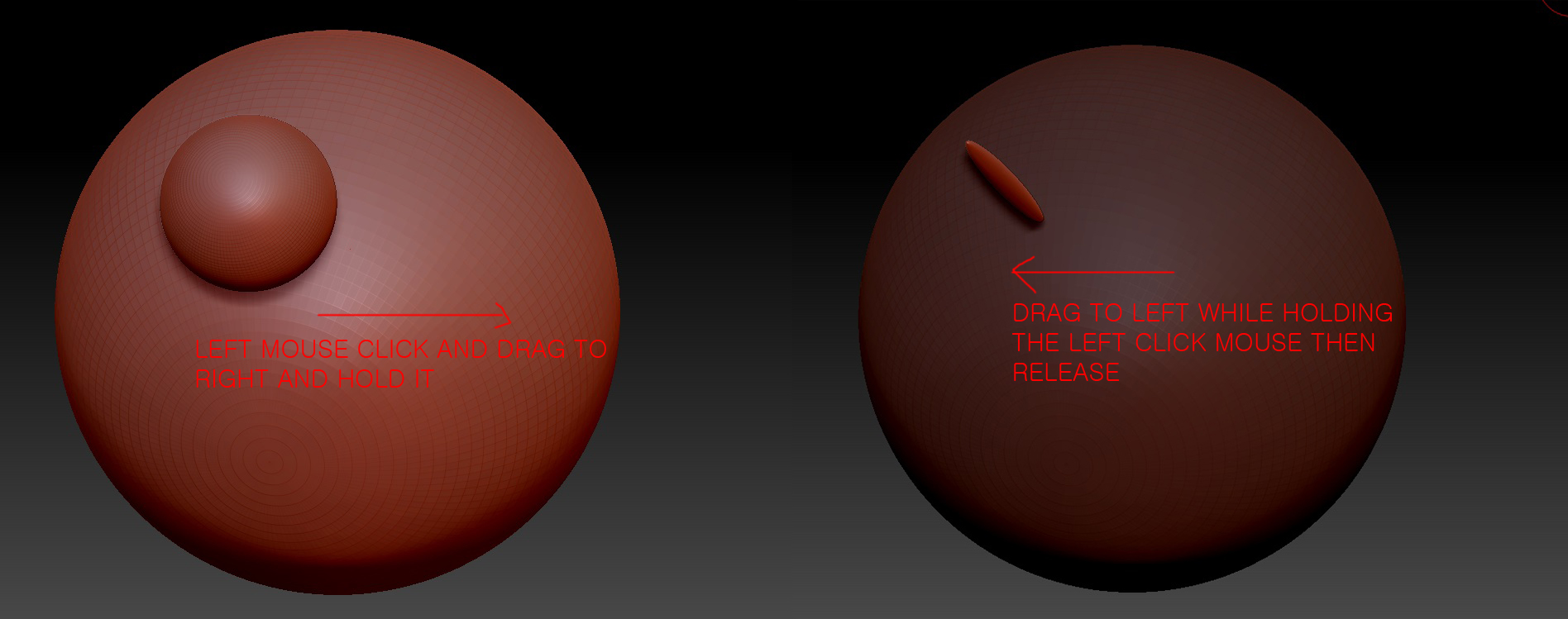
I am a newbie and have a question in regards to insert mesh. as you see the image firstly I left click mouse and drag to the right but while holding it, drag again to the left.the sphere shrinks only at x and y axis.
it doesn’t shrink equally. any idea why??

Attachments
q1.jpg

This is a function so you can scale in 2 axis, as you see in the back track (going left). If you want to scale the object smaller if you go to big, simply release the mouse button and use the transpose scale to change the scale in all 3 axis (it will use the same point for scale).

I wonder why it is used like that.it could just be 3 axis scale in the first place. thanks for reply.

Well. It´s bit tricky and you can´t scale down while inserting the mesh. So just drag if you don´t like you can: Undo and try again, Use transpose Lines.
If your inserted mesh has been modiffied with the Alt key while dragging and you want it back to the right proportions you have to press Ctrl while inserting the mesh. This function restores the proportions and also inserts the mesh in the size of the brush. So for repetible same size insertions is the best choice.

Hope all this helps a bit while using IMM

Cheers