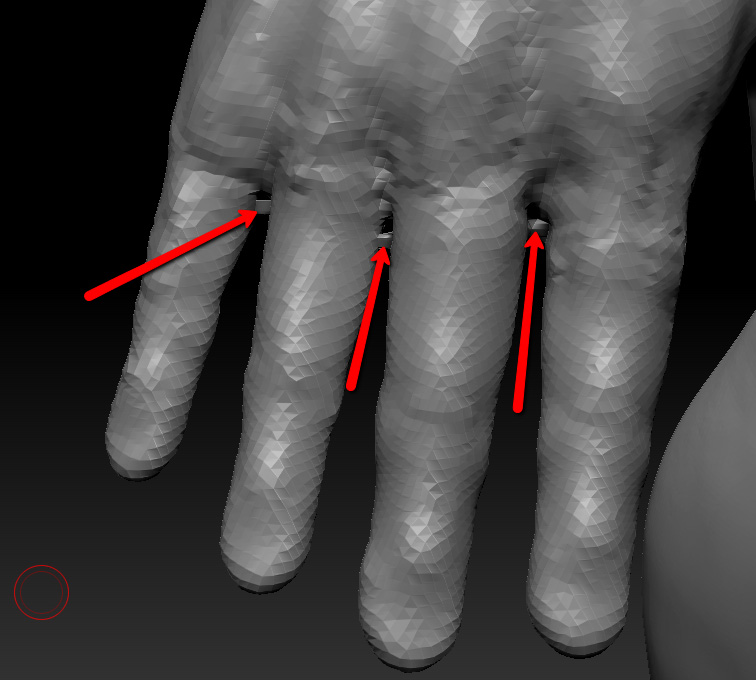
Hi all, I’m sure this has been covered before, but I can’t for the life of me find it in the forums (maybe i’m not using very good keywords for my search?). I’m trying to add fingers to a hand using an Insert Mesh Brush that I’ve created and weld it to the rest of my sculpt using Dynamesh. I’ve created the Insert Mesh Brush and added/positioned/scaled the fingers onto my ZTool, but when I use dynamesh, the resulting mesh has little polygon bridges spanning between some of the fingers.
I assume this is just the algorithm getting confused by the proximity of those fingers. I thought maybe there would be some type of threshold setting to control that, but I can’t find it in the UI or documentation. I know this is a ‘trick’ that other artists use all the time, but I can’t seem to find the tutorials that cover the process. Does anyone know if there is a threshold setting that can reduce/remove these polygon bridges? Do I have to just move the fingers further apart before dynameshing them into one mesh? That seems cumbersome. Is it possible I created the Insert Mesh in some way that’s preventing a clean weld?
I know that I can press the Groups button so that the fingers aren’t welded together, but the resulting mesh with the separate fingers has seams where the fingers join the rest of the hands which i can’t seem to sculpt out using the clay buildup brush. Also, I want to pose this model and i’m not sure if the fingers being separate will be a problem with transpose when i pose this character.
Thanks in advance for any answers and sorry if this has been covered in other thread (i seriously couldn’t find anything)!
Attachments