ZBrushCentral

Importing Objects Issue: Leaves trail when rotated or moved [picture]

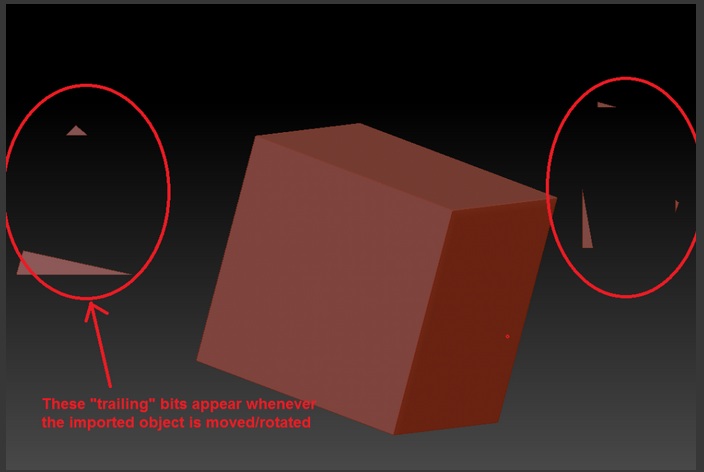
When I import an object from max to zbrush, for some reason whenever I rotate or move the object it leaves a “trail” behind it. As seen in the simple imported cube below. Any idea what could be causing this? Thanks

This also happens, to a lesser extent, with standard primitive brushes. Please see attached image below of a primitive cube .obj import

Using zbrush 4
Win7
Q9550
GTX 260 with latest drivers
DDR 2 4 gigs

Attachments
bvroken.jpg

If the trailing bits go away when you press CTL N while your mesh is still in edit, then its just a draw issue and CTL N will always clear these things away. It happens to me often.

Otherwise, you might have some loose verts or planes brought in by mistake I’m guessing, However I someone who uses max would have to confirm/diagnose this.

Thanks for the reply. The trailing bits do indeed disappear if I do cntrl+n, but as soon as I rotate or move again the bits come back. In other words, after every time I reposition the object I have to hit cntrl+n which is somewhat annoying. I can also confirm there are no lose verts or modeling strangeness. I just downloaded the newest video card drivers a day ago. Is there anyway to go about fixing this draw issue so I dont have to hit cntrl+n all the time?

Q9550
GTX260
4 GigsDDR2
Win 7