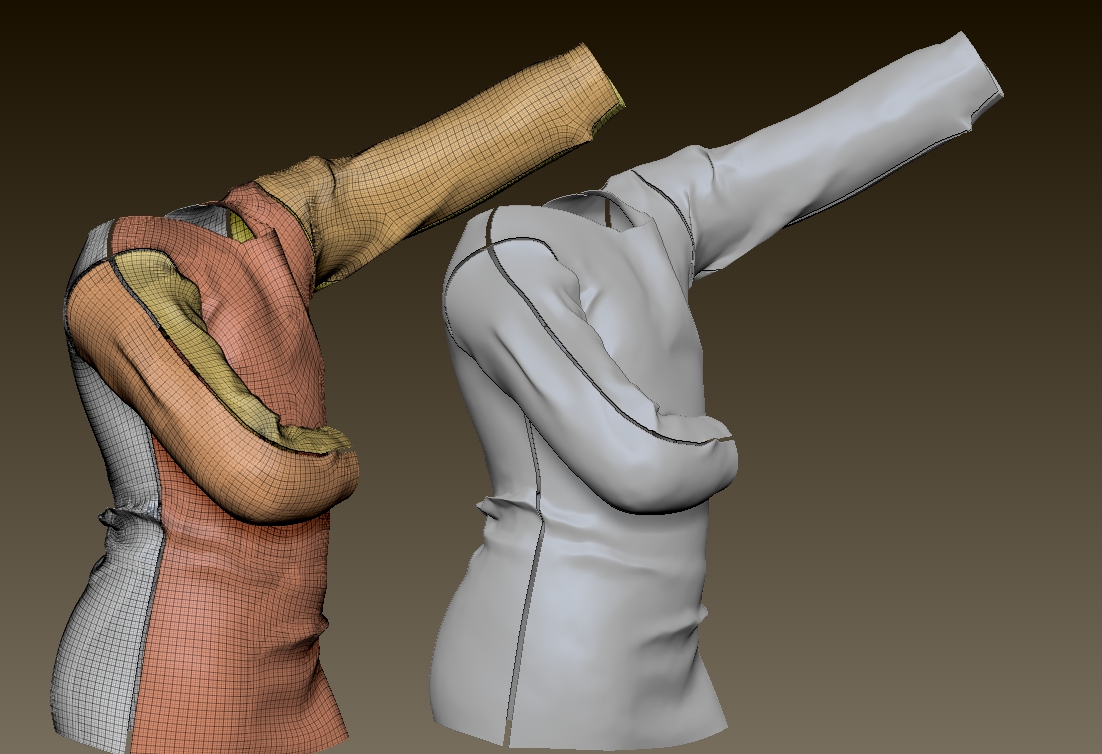
Hi there folks, been a while since ive been able to visit this lovely forum, alas i dont bring good tidings,rather a little headscratcher that is stopping me from progressing in my work.
So, upon importing a mesh from Marvelous Designer (even those of you that are unfamiliar with the software, its erelevant as it pertains to this issue, although i ‘may’ be able to get a solution on the MD end from the chaps over there). I digress… So import my lovely cloth model from MD into Zbrush, the cloth is then automatically split into polygroups as the mesh inside Marvelous Designer is comprised of several “patterns” this being the back of a garment sewing onto the front and so forth… my issue is, when i subdivide, the polygroups begin to split. Ofcourse i could subd without the SMT smooth option on, but then when i use the smooth tool, clay polish or any other polish feature the same will happen. i have tried dynamesh at a higher res but this fails to correct it, ive tried closing holes… nope. Ive also tried weld points (i think thats what it is called) basically under the ‘modify topology’ slider i have tried every option.
I am hoping the lovely and skilled persons at Zbrushcentral can help me out with this one 
this even happens if i group all the polygroups as one prior to doing any subd stuff 
Attachments