Hey,
I’ve modeled and unwarped a mesh in max and painted color map in PS.
Then i import the mesh into ZB and load the map through the texture, but i can’t get the map to fit onto the mesh like it supose to be.
What is the way of doing it?
thx
Hey,
I’ve modeled and unwarped a mesh in max and painted color map in PS.
Then i import the mesh into ZB and load the map through the texture, but i can’t get the map to fit onto the mesh like it supose to be.
What is the way of doing it?
thx
Not sure but you might just have to flip texture vertically.
I dont think that filping the map will help.
When i use Txr>Col i’m getting a very strange and blury result, the only way that i can realy see the map is when i change the UV type to Uvp. but then its a planner… and not my uv…
Does the texture look right when it’s applied to the model? If so, then it’s oriented correctly. If you’re getting blurriness when you transfer the texture to polypaint, the most likely possibility is that the model doesn’t have enough points to support the detail from the map. The model must have at least as many points as the texture has usable pixels. Anything less and ZBrush will need to discard data in the transfer, which results in blurriness.
Does the image helps to define the problem more?
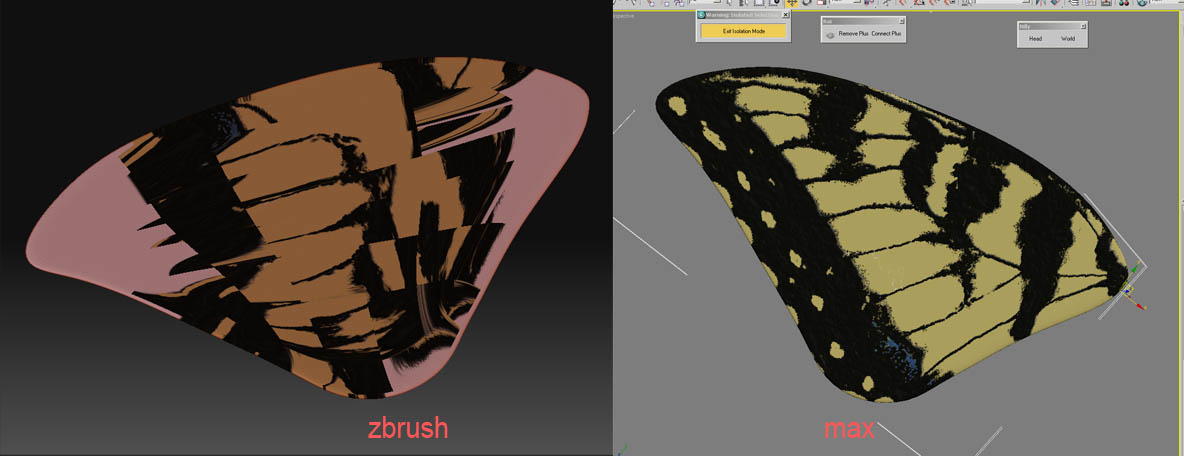
This looks like it needs to be flipped. Coming from most apps it will need to be flipped vertically. Max is, I believe, included in that. But on occasion you may need horizontally instead. And sometimes even both. But as I said, Max should be just vertical flipping. Tool>Texture>FlipV
Hay aurick, thanks for your help.
The uv’s was indeed flipped and now they lay on the model right but still it looks like a mess…
I’ve doubled checked my uv and they are good.
This is the first time i’m trying to lay maps in zbrush, am i missing something?