Hello folks-
I’ve spent some time sculpting a mesh only to realise that my UV’s need to be reworked. Z Brush’s native AUV/ GUV tiling isn’t an option.
The workaround that has been recommended to me doesn’t seem to be working. In short I have…
i) Reduced my .ztl to it’s lowest Subdiv level.
ii) Exported this mesh as an .obj.
iii) Imported this mesh into my 3d app of choice (tested both Maya & Blender) to create my UVs.
iv) Loaded my hi-res .ztl onto the ZBrush canvas, readying it in edit mode within z-brush at SubDiv level 1.
iv) Imported my ‘low-res mesh +UVs’ back into Z-Brush and ‘into’ the active .ztl by pressing Import.
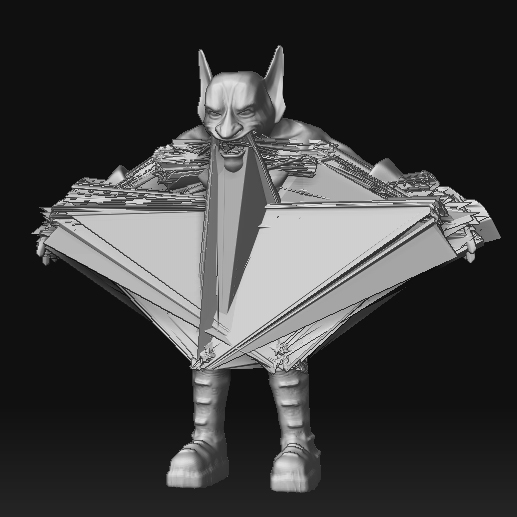
The attached image shows the error that is occuring once I apply subdivision to my new mesh. Everything seems fine at SDiv 1, but once I try to jog back up to higher levels of SDiv, everything seems to go rotten. UVs are in place, which is groovy, but I can’t access the work that I put into sculpting the mesh prior to the export.
I’m 99% certain that my mesh hasn’t been rescaled during the import/ export process, and I’ve experimented with polygroups… just in case  .
.
I’m wondering if anyone has a work-around to this problem, or might recognise something that I’m doing wrong… when you need to go outside ZBrush for UV mapping, adn you don’t want to lose any hi-res work that you might have done in Z-Brush, what do you do?
Thanks for any help
DM
Attachments