ZBrushCentral

I seem to have bumped the dimmer switch...?

I’m still pretty new to ZBrush and the forums here, so… newb question:

I keep dimming my scene as I’m working. I think there’s an Alt+[something] keyboard command that I keep hitting as I’m working, somewhere in the ZXCV neighborhood of my keyboard. As you can see here in the world’s laziest composited screencap:
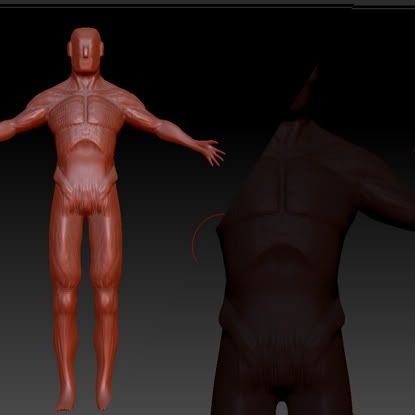
this causes my scene to look light its lit at about 50% brightness. Switching to the flat color material (set to full white) confirms that it isn’t the material.

What is it I’m hitting, and how do I reverse it without having to close and reopen ZBrush? Googling for an answer is difficult without even knowing what setting it is I’m adjusting. Any suggestions would be greatly appreciated.

Attachments

Untitled-1.jpg

You’re accidentally masking your model. Ctrl+Clicking the canvas will do that.

Yep, that does seem to be the case. facepalm I can’t believe I didn’t think of that. That comes with still being a newb to the program, I guess.

Thanks!

I think it might have been (instead, or in addition to the previous suggestion) that I was hitting the ‘C’ key, changing the color of the light on the model. I noticed that the two color swatches were black and dark grey, and after switching the gray back to white, it looked as it should have.

I hate to bump this old thread, especially over something so noobish, but… I dunno, a bit of knowledge for posterity’s sake, I guess.