ZBrushCentral

I need some dimensions! [Answered]

Hi all,

I use Zbrush for jewelry/product design. I usually get specific dimensions to reference - is there REALLY no way to use some sort of ruler in ZB? I know I can import/export .obj files and they maintain their dimensions. Maybe there’s a plugin or something? In my dream world I could even calculate volumes…

Yes? No?

tx…
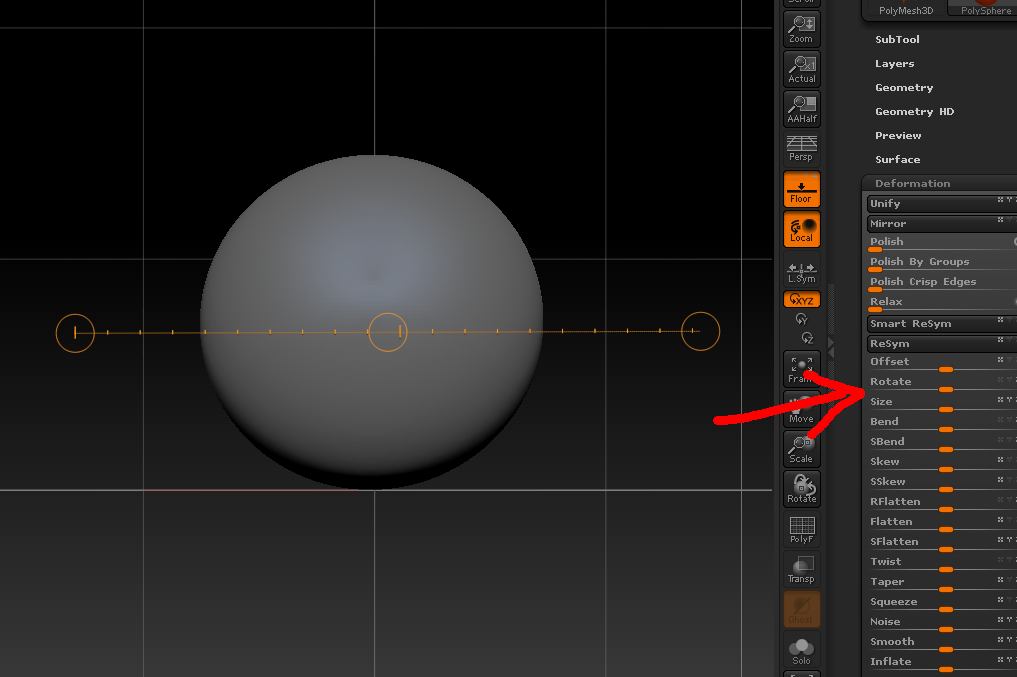
You could try and set up scale reference in Preferences > Transpose Units which will use the Transpose line. Unfortunately, the Transpose line hides when you use it though. I could never understand why it does. It would be easier to scale something if it didn’t.

If you need to scale something exactly you can use the Transpose actionline as the ‘ruler’ and then adjust the size in Tool>Deformation>Size. The actionline will stay visible that way. (Turning on Preferences>Transpose>Align ActionLine to Axis may also help when measuring.)

Attachments

Ruler.jpg

Thanks for pointing that out Marcus. I’ve never used the Action Line with Deformation before. I always used either one or the other.

Hi guys,

Thanks for the responses. Is there any way to measure? Like if I need to make a feature that’s 4mm long, can I use any sort of measuring tool to verify?

tx,

dh

ZBrush doesn’t have a real world measurements system so what you need to do is import something of known dimensions so you can calibrate the Transpose actionline in Preferences>Transpose Units.