ZBrushCentral

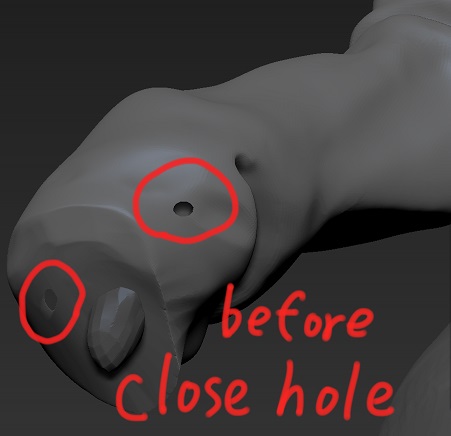
I could'nt close hole.

bigining,I do not know ,why***12288;the hole was open?

Let me see the picture.

I tried a close hall,and bugs came out.

I tried a number of ways for the bug, but bug does not go away.

If there is a hole, work is difficult.

Is there a way to close the hole something?

I’m sorry in clumsy English.

Takuto

Attachments
p1.jpg

what does it look like if you do tool.geometry.modify topology.close holes?

if it is really can’t close as usual,you can mask around the hole and press Ctrl W to group this,and then hold ALT to insert mesh(use insertHclinder) ,finally smooth that out like this:

QQ截图20140703151353.jpg

Takuto,

Ohaiyo!

Can you make you model a Dynamesh? this would also help you to close hole. what you can do is mask off the area you want to close. Split it and make it a separate subtool. Next make that subtool a Dynamesh at a high resolution, I would turn off the polish, then CTRL Click drag. Hole should be closed. Next Merge that subtool with the original model it came from. then smooth the clip lines after merging.

I hope this helps.

~ Gridlost

Hi all

I used move brush and gather hole more small,

and I repeat the Dyna mesh ,Dyna mesh ,Dyna mesh ,Dyna mesh …

The hole and bug disappeared.

thank you.

Takuto