ZBrushCentral

How to turn off Adaptive Skin coloring?

Helloooo…So I’ve searched for this for a while, and it’s incredibly frustrating because I can’t find an answer.

So, I made a zsphere model and turned it into an adaptive skin. Well, now where each zsphere was, there is a different color. I don’t know what it’s called but how do I toggle it on and off? Thanks!
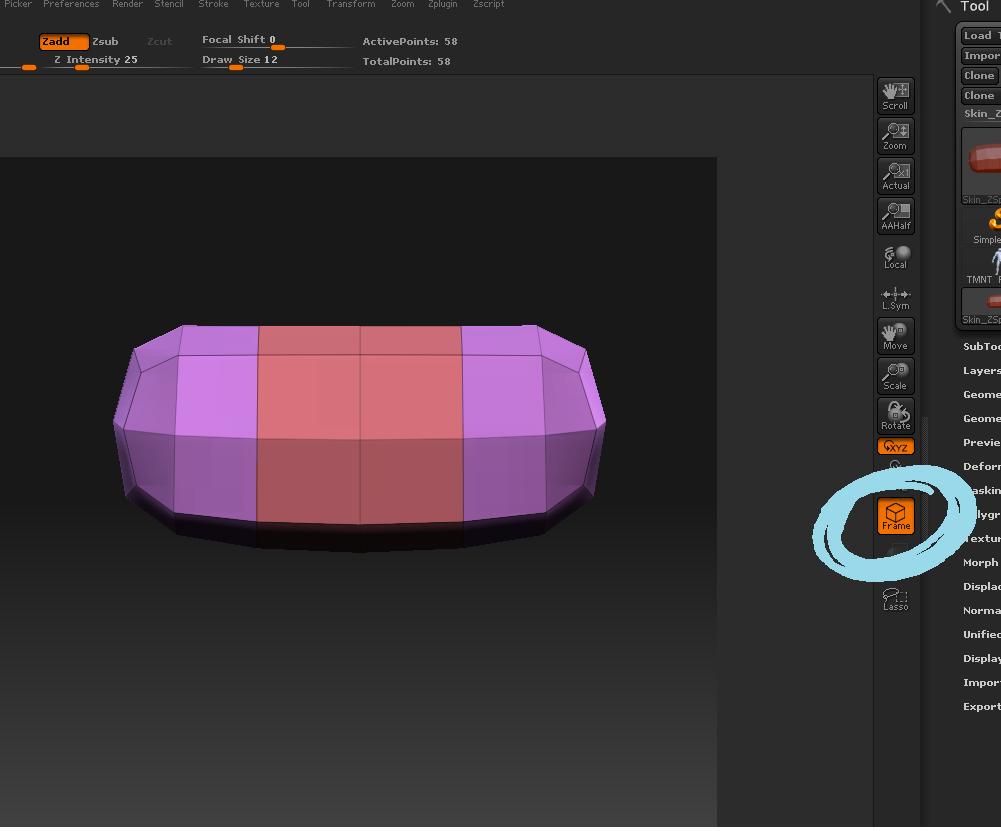
[[attach=155189]frame button.jpg[/attach]](javascript:zb_insimg(‘155189’,‘frame%20button.jpg’,1,0))

Does it look like that? If so, then all you have to do is press the “frame” button on the right side.

Attachments

frame button.jpg

Ah! That was it! I figured it’d be something easy…Thank you so much!

You`re welcome. :slight_smile:

There are also a bunch of settings in the Preferences>Draw menu that affect how the polyframe is displayed. For example, you can change the colors to grayscale. Or you can turn the coloring off entirely, leaving just the wires. Or you can modify the color and thickness of the wires.

hi! ( Using ZBrush 3.1 )didn’t know those settings existed. I prefer the default settings, but how do I increase the thickness of the wires. Couldn’t locate it under preferences> draw . there are three options that are inactive there.

It’s actually a little more complicated than just thickness.

By increasing the opacity, you make the wires stand out more, which makes them seem thicker. Also, the VariablePFO switch when turned off will make all wires the same thickness regardless of their subdivision level. So the wires that would normally be thinner because they belong to higher levels now become the same thickness as the level 1 wires.