Hello,
Actually just started using Zbrush, and I have to admit that it’s quite a step up from Blender if just for the ease of use.
That being said, there is one issue that I have:
-
I set my document to 256 x 256, Resized.
-
I turned off Constrain Proportions
-
I made the Range 0
From here, I hit “F” in Edit Mode to Frame my image (plane polymesh).
Then I clicked Document < Export.
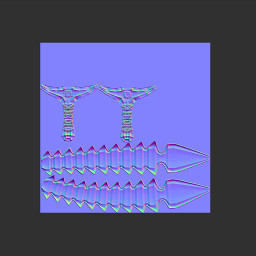
This is the result:
Does anyone know why there’s all of the grey space, even after framing the image? How would I go about getting rid of that?
Right now the normals are completely offset of the model, so it’s virtually impossible to use.
Thanks for any help!
Attachments