ZBrushCentral

How to seperate intersecting geometry?

What is the most efficient way to isolate geometry that is intersecting? I attached a picture of some crooked teeth that intersect each other in spots, how can i isolate each tooth and move them around without altering their shape too radically? I assume there is a way to isolate them somehow but I cant figure it out with just the masking alone, the masking doesnt seem to have enough precision on the face level. Also, Im not just wanting to know for this particular model im also wanting to know in general. Any idears?

Thanks in advance for any help!

Attachments
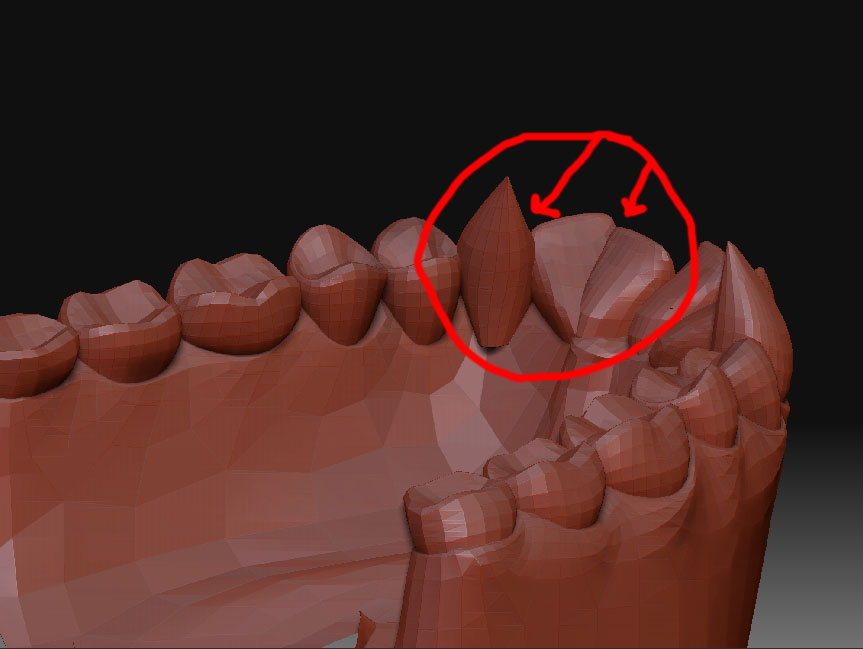
intersection.jpg

anyone? anyone? bueller? bueller? :slight_smile:

If it’s all one piece of geometry, then you can painstakingly mask of faces.
If they are separate pieces of geometry then you can try a group split or, if you have Maya then you can do a separate geometry in the polys tab.

I cant figure out how to mask specific faces. If i make my tool very small it snaps to the vertex instead of letting me click the face, if i try painting across the face it wont work unless i make my brush bigger then it starts affecting more than 1 face. Any ideas?

Click the lasso button, press control shift, make the selection with the mouse/pen the selection area will be green, lift up off the shift button (keeping the control button pressed) the selection area will be red indicating that the polys you selected will be hidden.
To un-hide press control shift and double tap on the work area next to the tool.
Hope that helps.

Another trick I use is to use the Auto-Groups button under polygroups.

(Assuming you don’t mind losing any current polygroup sets).

If you hide ‘most’ of the mesh and have only a few intersecting polys. Clicking
Auto-Group will group the offending polys separately. Then you can either
hide them, or unhide-all and select just the group you need.

G.