ZBrushCentral

How to sculpt this:

Hey All,

I’m very new and a slow learner when it comes to zbrush apparently, and I wanted to sculpt the key that is shown here. I was reading a tutorial in Zbrush Professional Tips book,which is awesome, and saw the shadowbox. However, when I attempted anything the mask always was like a blob and not very detailed at all.

I know there are a hundred and one ways to do things, but I haven’t found one that works…or it’s just me. So far my attempts don’t get much further than a wiggly line.

So if there is a tutorial that would really help me to figure this out, I’d love it!

Thanks!

Sean

ps. It doesnt have to look exactly like this, but I’d love to learn how to do something like this.

Attachments
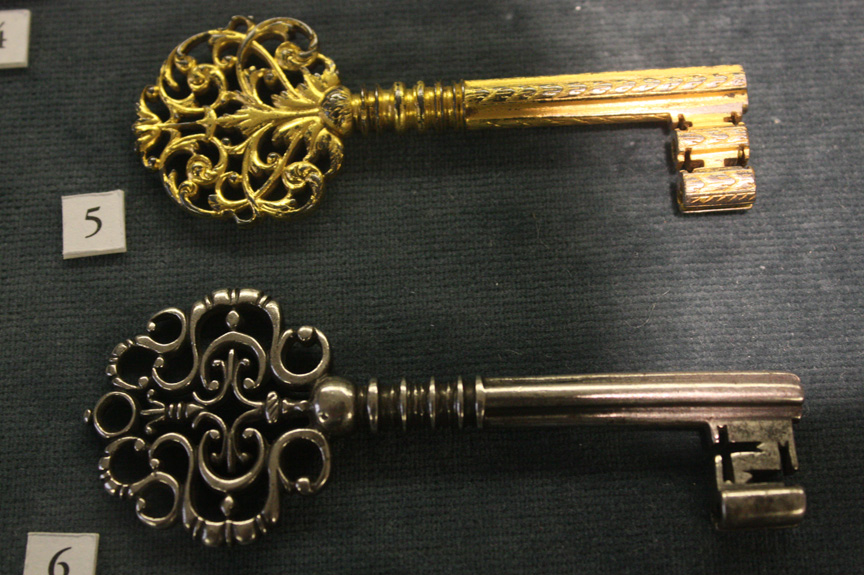
key_smaller.jpg

Have you tried changing the resoloution on Shadowbox? Various masking brushes to help with the process. Keep at it.

Yeah, Shadowbox would probably be best for the fancy handle and for the teeth. A plain old cylinder could be used for the shaft. You could even use some parametric masking techniques on the cylinder before converting it to a polymesh. From there you could remesh the pieces together into a single object if you wish, or leave them as separate SubTools.

If you wanted it to look very like the original, you might try zspheres for e handle. Do each curvy but separately, then sculpt the cuts and detail and add them all together.