ZBrushCentral

How to render Transparent tools in Z4R2? - Answered

I’m doing everything that is needed to render transparent objects (Z4R2) and it doesn’t seem to be working. =(

Okay, yes:

Its with BPR.
Transparency is turned on.
The subtool has the third Icon selected (intersect).
Transparency slider is set to .75 so I can really see the trans…

sigh

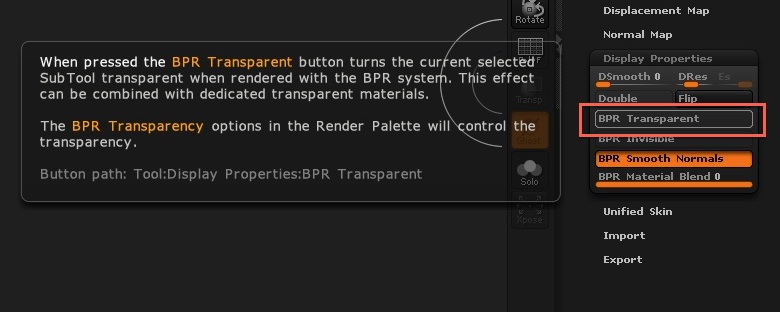
You no longer need to use the subtool intersect icon. Instead turn on the BPR Transparent button in Tool>Display Properties. :slight_smile:

Wait, I’m confused. How do you get a specific subtool to render transparent?

Instead of the intersect icon in the subtool panel use the BPR Transparency button in Display Properties. In the what’s new documentation its 2.19 on page 112

Attachments

Untitled.jpg

AAAAAAaaaaaaa!

K!

Thanks a bunch!!