Hi Guys perhabs a stupid newby question but i want to move different subtools at the same time from for example left to the right how can i manage this without merge them down, in photoshop you can klick the layers and move them all together, i hope you know what i mean?
gr. Silberdenar
in the canvas?

hi Andeseloy, no that os not what i mean, i want to move these 3 subtools at the same time!?
gr. Silberdenar
Attachments
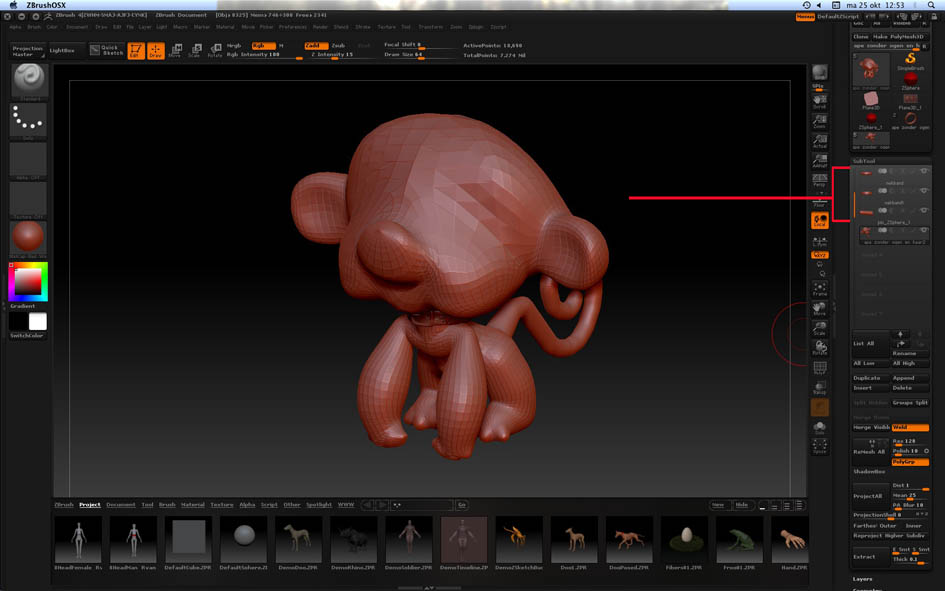
There’s a very simple way, providing you follow the method exactly:
- Position your model so that you can see it clearly with respect to how you want to move the subtools. It’s important not to move the model during these steps.
- Switch on Move mode and draw out the action line.
- Move a subtool. You MUST move it in one go, without lifting the mouse. (You’ll be able to fine tune the positions by repeating the process later.)
- Press the DOWN ARROW (or UP ARROW) key to select another subtool. Do NOT click on the subtool in the viewport to select it, or rotate the model at all.
- Press the ‘1’ key. This is the hotkey for Stroke>Replay Last and will repeat the move for the selected subtool.
- Repeat steps 4 & 5 for the remaining subtools.
You can repeat steps 3 - 6 as much as you want but remember pressing ‘1’ will only repeat the last canvas movement.
HTH,
thank you thank you thank you, that’s what i was looking for!!! small_orange_diamondsmall_orange_diamondsmall_orange_diamondsmall_orange_diamond
gr. and thanks again Silberdenar