ZBrushCentral

How to make splited groups to be seperated subtools with a closed shape?

Hi guys I’m new to Zbrush and I know this must be a very basic question. When I split the head and body of the deer shown in the pic into 2 groups and make them as 2 subtools, I was wondering how to make the two parts into closed shape? Namely, how to fill the vacancy near where the two parts meet? I tried merging the two parts and tried to use brushes to fill the wild seam but unsuccessful.

Thank you for your help!

Attachments
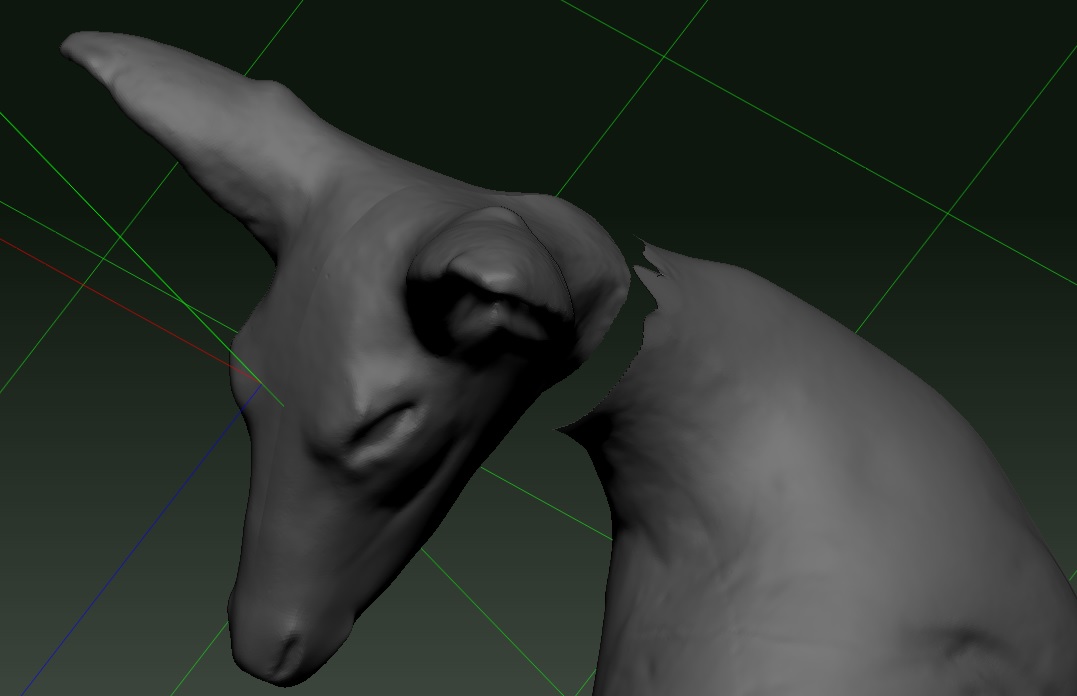
q1.jpg

hey!

check this video, it explains the use of the curve bridge brush, I think it can help you

I used that in the following image, the ear and head were different groups, and the curve bridge brush created the purple “bridge” and filled the gap.
pretty useful.
curve bridge brush tip.jpg

Alternatively, you can use the move brush to move the edges of both parts, until they meet each other and intersect, and then dynamesh everything, that will merge everything and fill the holes.

Is there any tool for copy same color area like Magic Want Tool ?