ZBrushCentral

How to keep Retopo-Mesh from changing shape - Answered

I’m sure game modelers can answer this question: I have a nice retopologized mesh, subdivided it several times, then imported the hi-rez mesh. You need to have the low-rez and the hi-rez version in the same tool in order to create Displacement maps etc.

Ok, but unfortunately the importing of the Hi-rez mesh will alter the Low-rez mesh. Sad. I want the original retopologized mesh as my low-rez. I think it would make a better realtime mesh (even though for now I’m just planning on having a nice low-rez mesh to animated in Maya).

I’m not sure if maybe the “Cage” button is the solution, don’t quite understand it.

Attachments
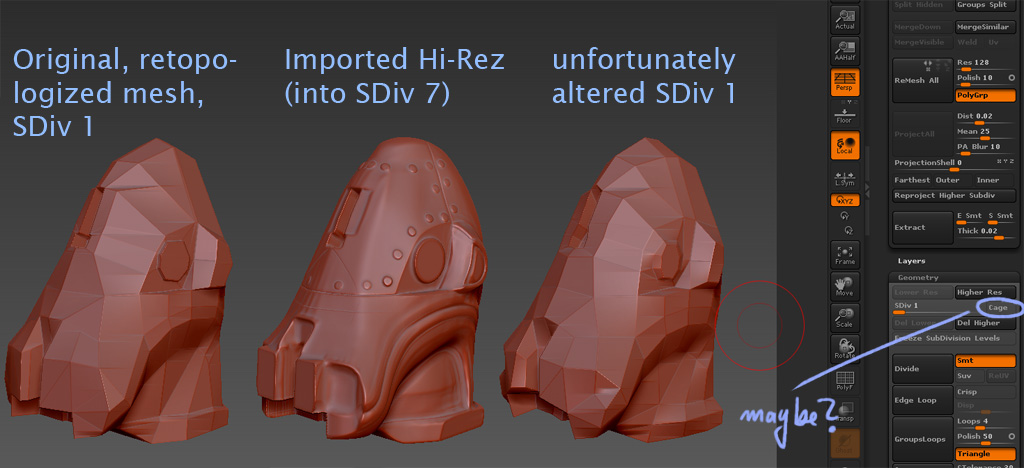
CageMaybe.jpg

At level 1 use Tool>Morph Target>StoreMT. Then do your import. Whenever you return to level 1, use Tool>Morph Target>Switch to return to the stored state. Whenever you need to return to higher levels, Switch again to return to the multi-res state. (Otherwise the low res mesh would influence the high res one, the same way that the high res one is currently influencing your low res.)

Basically, any change made at a subdivision level affects all other levels – but only when you switch levels. So you can use the morph target to bounce between versions of your low res model all you want without affecting the higher levels, so long as you don’t actually change levels. This allows you to go to level 1, switch to the mesh that you’ll apply the map to and then create that map.