ZBrushCentral

How to delete unseen part?

hey everyones, im trying to create a superhero character here and i’ve met a problem

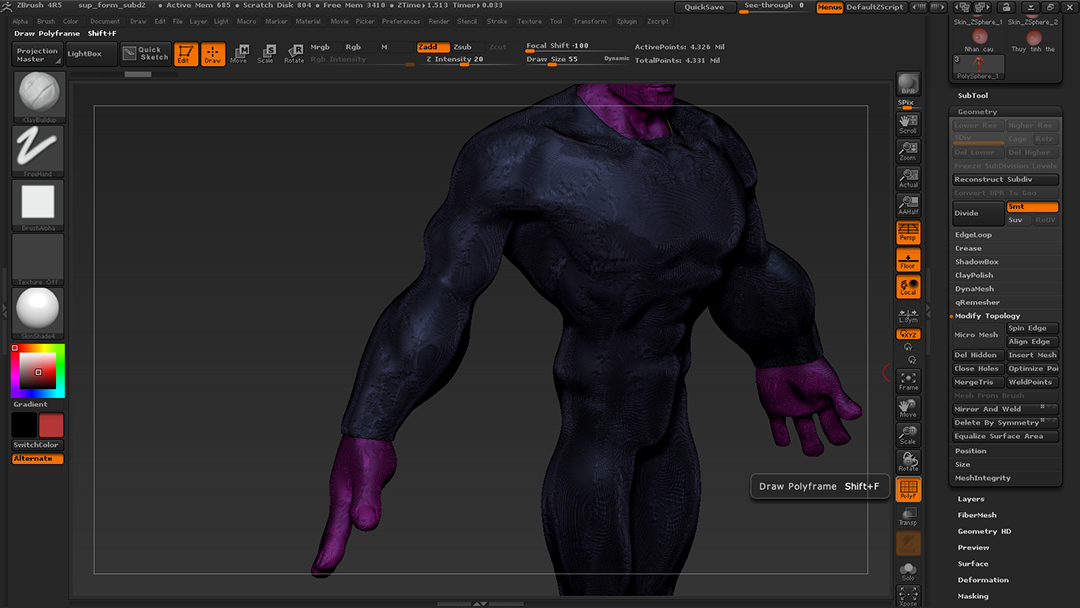
when i created his suit i used mesh extraction then merge it into his body subtool. but afterthat i found my points’s up to 4 millions, but the body itself was only about 1 million, so i realized there’re some unseen points left under the suit. is there anyway to delete these points? as you can see im having 2 polygroup now

Attachments
7.jpg

hi, if you really don’t want any thickness you can set thick to ZERO before extract. but if you want the open edge look like it have thickness,but want to kill other area of the inner face, i think you should use polygroup—>group by normal,and then hide the mesh you don’t want,and go to edit topology–>del hidden …:confused:

thank you namdoyle :slight_smile: ill try it

Mesh extract should leave you with a few polygroups already that cover the thickness portion, and the inside (I think I see a yellow group around the inner portion of the neck). If those still exist, it might be cleaner to use instead of regrouping by normals.

Cryrid, the yellow group you seen is the thickness, my new suit subtool has 2 polygroup, the thickness one and in-and-outside one (the inside of the suit has the same violet as outside). but it’s ok with the suit because i can turn the inside to a new polygroup then delete it. but what about the skin of his body? i’ve accidently erase the mask i drew to make extraction T.T now i have to draw it again? T.T

Autogrouping with the inner/outer polygroup isolated would cleanly split them.

Do you need the skin for anything in particular, or do you just want to get rid of it where the suit begins? The slice brushes should give you clean cuts with automatic grouping as well.

i dont need the skin (i guess). okay ill try slice brush, thank you :slight_smile: