I’m trying to get some smooth, detailed wrinkles on my modelled head, but I just can’t get it right. I followed this guide for modelling your own Picasso, but there’s not enough information how he gets such great wrinkles.
http://www.highend3d.com/zbrush/tutorials/project_walkthroughs/18.html
I use the following settings:
- Division level 8
- Texture 2048.2048
- Zoom in completely
- Drop to canvas with projection master (color, material, fade, deformation and normalized checked)
- Use a decobrush (default settings)
- Use the full alpha (1?) and a square stroke
- Set tool to: zsub, no material, no texture
- Draw size 8, z intensity: 10
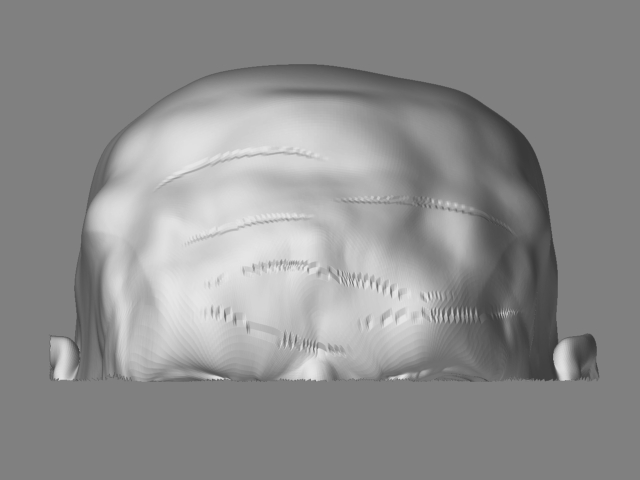
When dropped to the canvas the wrinkle appears smooth, but when I pick it up it is completely aliased. Here is the difference:
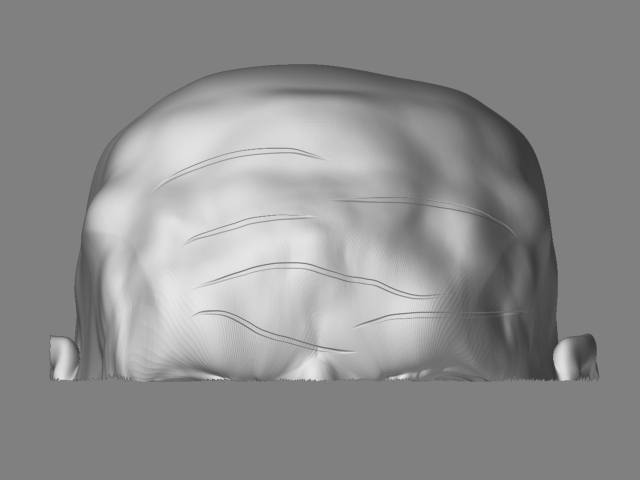
Although the rest of my model is very detailed and smooth, the wrinkles always turn out completely aliased (and thus useless).
1 - Does it matter at what division level I drop it to the canvas (with PM)?
2 - Does the size of the texture matter?
Any help would be greatly appreciated!
berco
Attachments
 And thanks to Aurick for the great tutorial!