ZBrushCentral

How to create an exact parallel curve

Hello Everyone,

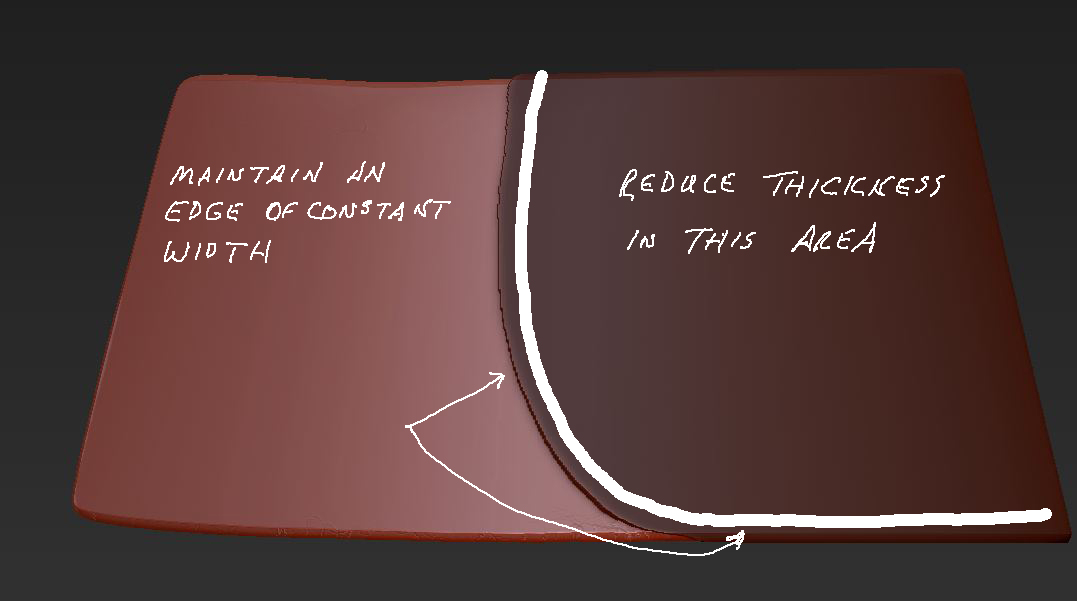
I’m attaching an image that shows what I would like to do. Basically, I would like to erase most of the mask (the interior portion), while leaving an edge masked. I want to maintain an exact width along that masked edge.

The idea is to use the layer brush to cut away that interior portion, while leaving the edge masked to maintain its thickness. So, I need to be able to draw a curve that is exactly parallel to the existing curve, and I need to extend that along the bottom edge. I can approximate that freehand, but I would like to be able to maintain an exact width. Can anyone explain how to do that?

Thanks,
DocPit

Attachments
CurvedMask.JPG

This may not have the accuracy you need but its worth a shot:

  1. Mask the area you want to create a border edge around (as in your picture)
  2. hide the unmasked part
  3. From the Visibility submenu of the Tool palette select “outer ring” (hide any part of this ring you don’t want from the result.)
  4. Finally, use the “grow selection” option in the visibility menu to widen the edge until you are satisfied. Turn that into a polygroup you can hide or mask it off.

Actually its probably easier just to fill the mesh with white and use the layer brush in rgb mode to draw a nice smooth border edge of even thickness in black then “mask by intensity” and optionally turning the created masked border into its own polygroup.