ZBrushCentral

How to change the "start up" document size

Hi PixoPeeps,

I recently got a new monitor with more resolution, and now when I start up Z Brush the document size is so small. I have to resize it each time I open up Z. Is there a way to change the default document size at start up? I need it to be bigger (see picture)

Also, why I am on the topic, can I also get rid of the sphere primitive that loads by default?

I am running OSX if this matters.

Any tips are appreciated.

e~
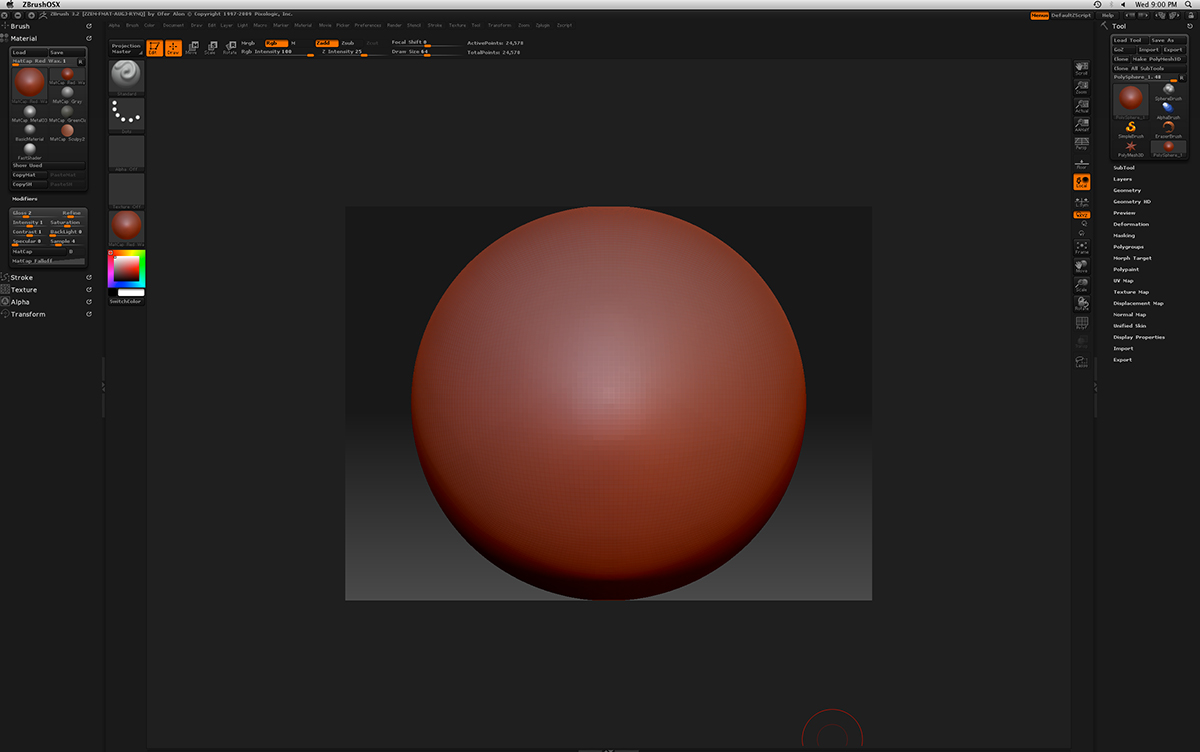
zScreen.jpg

You can create a Startup document. Simply set up the document how you want and then save the file in the ZStartup folder as StartupDocument.zbr

See here for more information:
http://www.pixologic.com/docs/index.php/Startup_Document

Note: for users of ZBrush 3.5 R3 for Windows, a Startup document will currently cause problems with ZAppLink.

Thank you, Marcus.