ZBrushCentral

How to achieve low poly count when importing Poser?

I am a big fan of Poser Pro 2014… I like to start my base meshes using Poser then import them to ZBrush to add further detail…

But one thing I noticed is the high poly count when I import the poser figure as an object. I tried using Dynamesh to lower the Polycount but it destroys the detail of my object. Unless I keep it at very low res. Are there tutorials or way to import Poser models and lower their Polycount without having to resculpt the whole thing?

Thanks in advance!

http://docs.pixologic.com/user-guide/3d-modeling/topology/zremesher/

Thank you but that did not work for me. When I sub-divide it the polycount still doubles.

I’m not sure your question is entirely clear. In order for you to have detail you need polygons, which requires a high polygon count. But you are wanting a low polygon count which would inversely lower your detail.
Are you wanting to use high poly normal maps on low poly meshes, or maybe you could revise your question for us.

Thank you but that did not work for me. When I sub-divide it the polycount still doubles.

Of course. That is what subdividing is supposed to do.

zRemesher WILL reduce the polycount for you- but you do need polys for detail.

Import Poser figure

User zRemesher to reduce polycount

Subdivide to sculpt/add detail.

You can also use Dynamesh (on a duplicated subtool) for sculpting, then project the detail onto your subdivided zremeshed object.

Sorry for my confusing question.

To clarify… I’m trying to achieve a low polycount after I import a poser model. When I subdivide after selecting both ( separately ) Dynamesh or Remesher the count still is on the high side. I know the goal is to keep a low count when you render other wise it will freeze up or take a long time to render. Wanted to know some ways to get a low count to speed up the rendering process.

Thanks

Where are you planning to render? Low poly counts are desired for animation and game graphics…what is the current point count and what do you desire to have after this process?

I was planning to finish my model back in Poser. I am trying to learn ZBrush to add detail and create my own accessories, clothing etc; Do you suggest I don’t render my final product in ZBrush? I render them there so I can preview what it will look like before I export them back to Poser.

When I first import my model from Poser to ZBrush my count is at 63,000 +. When I subdivide to at least 4, it increases it to almost a million.

To add another point to my inquiry here…

One of my goals is to achieve a clean cut mask. When I mask on my model that I import from Poser because it is such a high poly count the mask is not sharp and has jagged edges. When I subdivide I get a better mask. But then my points are higher. I still get jagged edges though. Would love to also learn how to get a nice clean cut mask without jagged edges.

:slight_smile:

appreciate the input!

To add another point to my inquiry here…

One of my goals is to achieve a clean cut mask. When I mask on my model that I import from Poser because it is such a high poly count the mask is not sharp and has jagged edges. When I subdivide I get a better mask. But then my points are higher. I still get jagged edges though. Would love to also learn how to get a nice clean cut mask without jagged edges.

Probly should be in its own thread, but…

The reason the mask looks jagged is not because the polycount is too HIGH - it’s because the polycount is LOW on the Poser basemesh (63,000 polys is nothing). But that doesn’t really matter for making a mask.

Import poser .obj and draw mask:
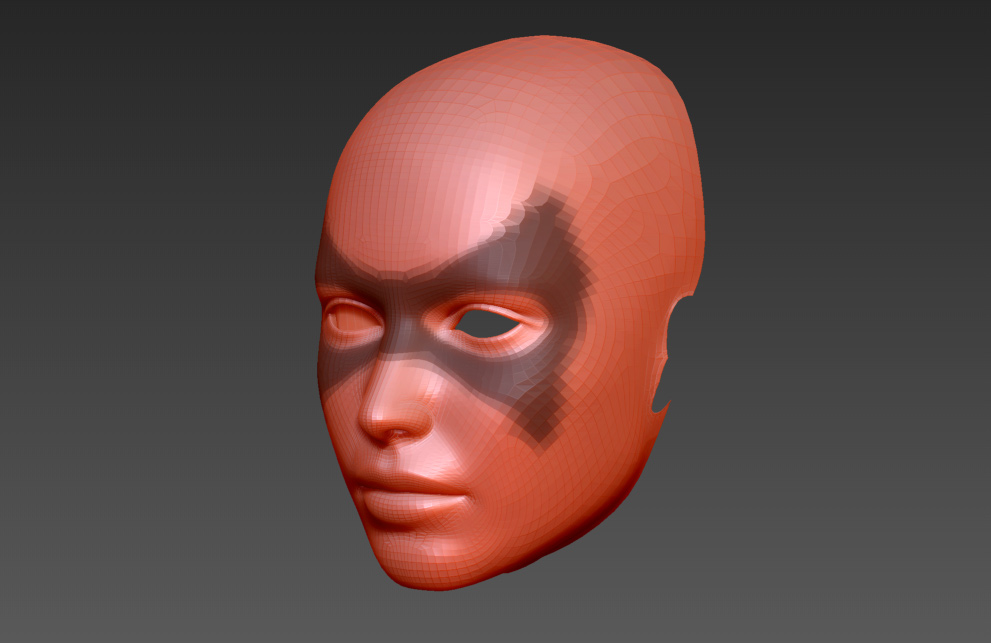
mask-001.jpg

On the keyboard hit ctrl-shift-e to create an edge looped group (and clear the mask):
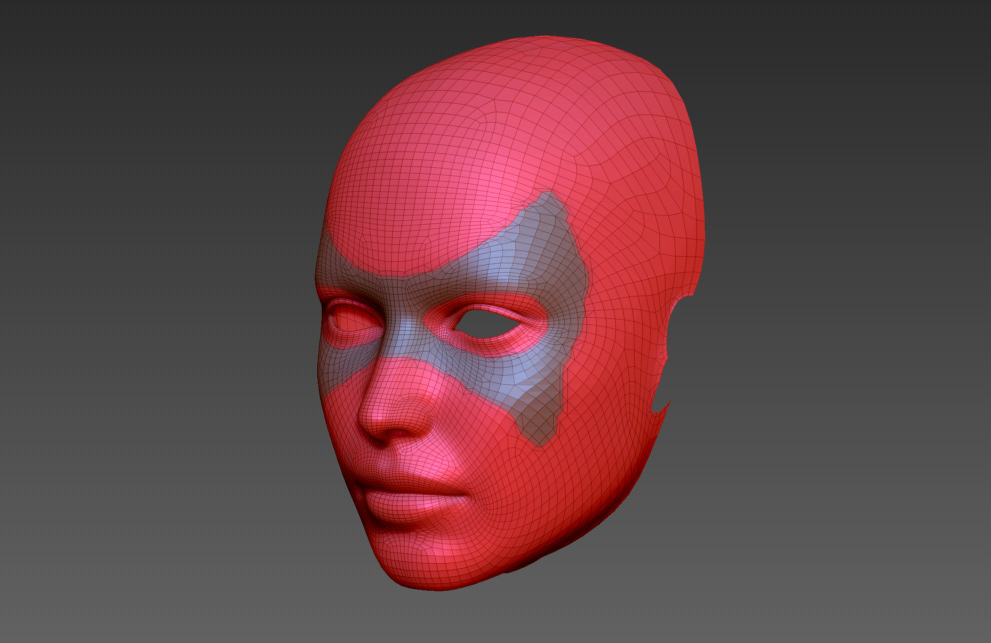
mask-002.jpg

Go to Deformation > Polish by features (slider to 100):
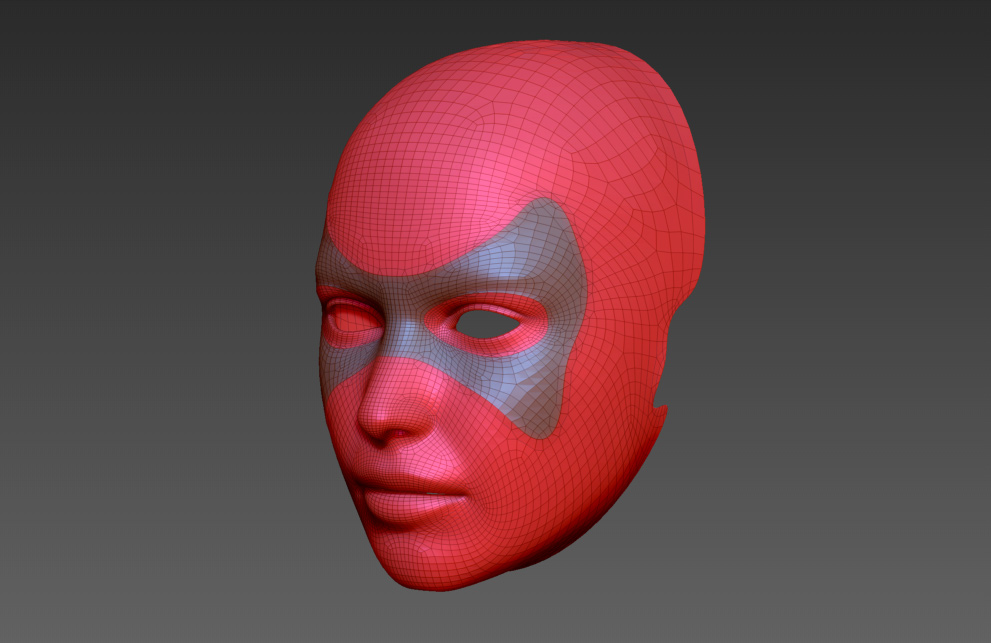
mask-003.jpg

Go to Tool > Extract (play with the settings for thickness, etc):
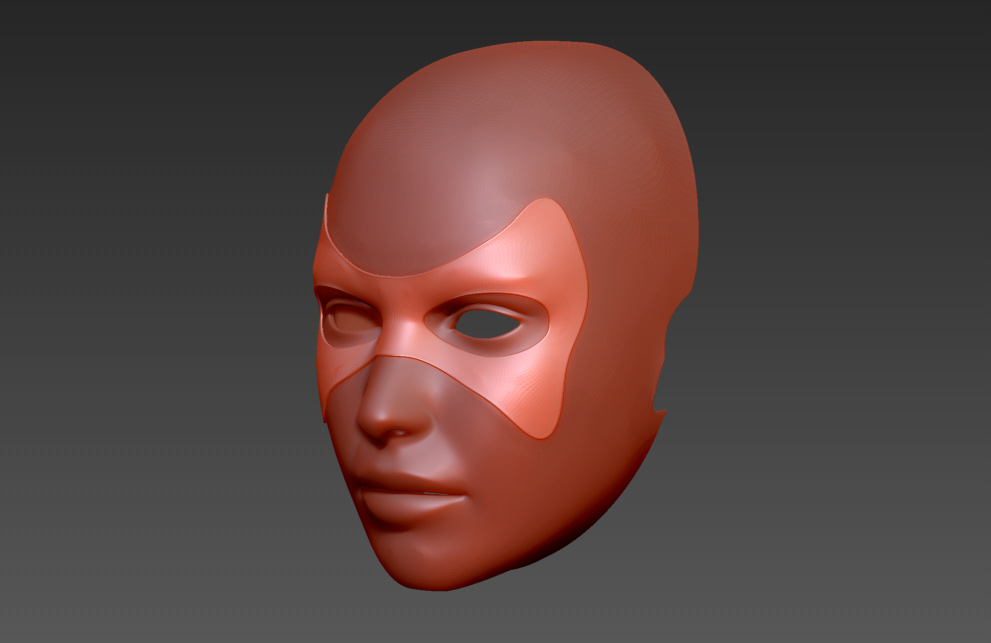
mask-004.jpg

That’s it. No subdividing at all. You can clone the mask subtool and export it as an .obj to import into Poser.

Also note: none of these images are renders. I just clicked the AA half button and exported the image. If you want to quickly preview in Zbrush, you should look at the Display properties palette. Play with the DSmooth, DRes and ESmooth sliders. You can smooth a low poly model without subdividing for previewing. Turn off the “Quick” button, and do a BPR.

Thank you very much, Thor, that comes handy! :slight_smile: