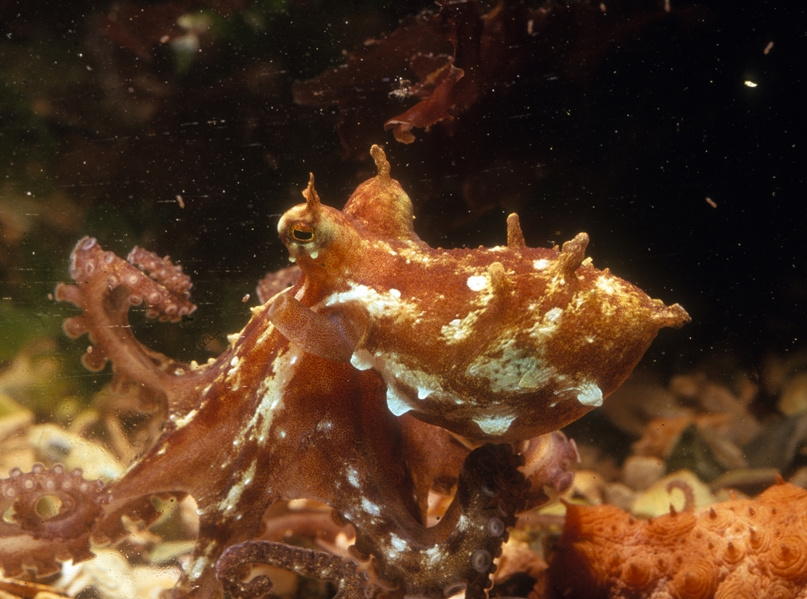
I’m currently working on an animal which does have in certain areas surface details which look like branches. Not to many twigs on the side, but more than a simple displacement in normal direction. The image of the octopus might give you an idea (on the back and on the eyes). The details I’m going for are a bit more detailed. Imagine it looks like a very, very, simple tree. A stem with two, three branches. So, how would one achieve this? As it is a complex form just a simple alpha brush won’t do. I don’t know whether it’s possible to have a “vector displacement brush”. I could model two, three different “trees”, turn them into a map and then stamp the details on my mesh. But I guess this way I wouldn’t get necessary details in the spot where I would use the stamp. In Modo or SI I could clone copies over the mesh, reload everything into zBrush, but how would all the details be merged with the base mesh? In Sculptris, thanks to the dynamic mesh creation, I could model all these details by hand, but then it would be a lot of work to do this. Is there a good tip how to do this? As I’m not familiar with advanced zBrush workflows I would need somebody who pushes me in the right direction. Thanks for any tip or hint! Cheers http://portphillipmarinelife.net.au/images/species/speciesHero_525841.jpeg
Make a couple variations with the end you want to stick on open, not closed. Then create an IMM brush from them. Insert away.
Thanks for the quick reply! I’ll give it a try.
Thanks again!
If it really does just look like a “simple” tree with not too many branches as you say, you might just want to use the Curve Tube brush to sketch out some quick branches from the body, position them, them sculpt them into finished form.
If you have a lot of repeating elements, then as Doug says, go with an IM brush.