ZBrushCentral

How do You pro's do detail without raping the cpu?

This might be a question that’s be done to death, but from a quick glance I couldn’t find it on the first pages.

So I’ve watched a bunch of mouth watering videos where people start with a basic sphere mesh and sculpt with the brushes a mighty fine detailed human face and I have no idea how they manage to pull of the detailed spots such as nostrils or ears without ending up with what I do - huge blocky polygons.

Can a face be modeled from a sphere to a detailed state without exceeding the limit of 5mln active points?
Dividing geometry is the only method I know but to achieve the amount of detail that I see in other peoples work would require me to divide above the 5mln threshold and that starts to lag my cpu both in zbrush and then 3dsmax.

Masking an area and dividing only parts of the model would be a sweet solution if not for the distortion around the edges upon sculpting.
Also considered zsphere zscetching of the required details first but that’s just not the preferable method for me.

I’ve found this video specifically intriguing http://www.youtube.com/watch?v=FA4U4K88nxk (though not from a sphere) where the artist uses a number of clay parts and then magically merges them together. What is the magic? Do those pieces of mesh really then form a single one without no seems in the middle? Whats the process of that?

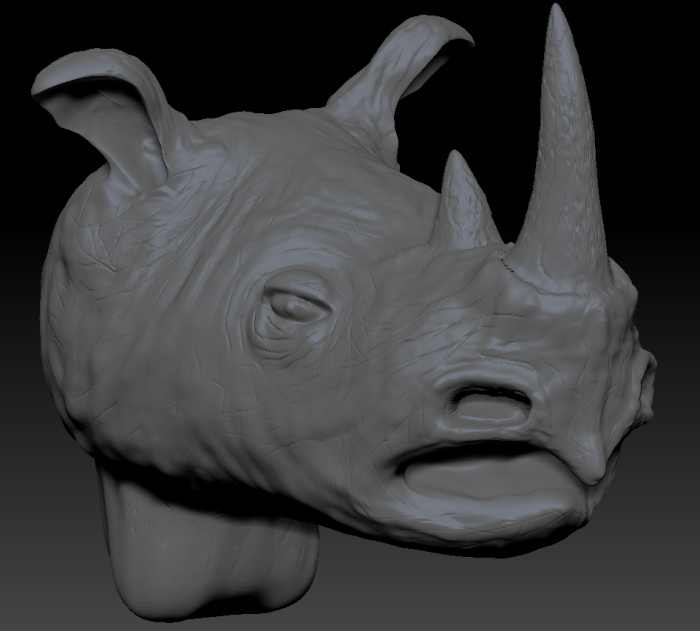
As a peace offering I present to you my first ever (crappy) zbrush model - the horns are a perfect example of my problem - looky how eeky stretched they are.

Cheers

Attachments
rhino.jpg

It can be helpful to start with slightly more polys at the base level, which can make the difference between a 5 million mesh and an 8 million mesh at higher subD levels.

In any event, even a 5 million poly mesh can hold quite a bit of detail. The trick is just to have evenly distributed polygons. So features like Dynamesh, the Remesh and Projection tools, and Reproject Higher Subdivision can all be very useful for making your mesh more highly sculptable, and eliminating stretching and distortion.

ZB doesnt actually have a hard poly count cap. But since Subdivision is by a factor of 4, subdividing a 5 mil mesh would produce a mesh of 20 mil polys, which exceeds the max limit defined in your memory preferences. I think that limit is set to something like 8 by default, but depending on your systems capabilities, you can increase that further. On my system, ZB works with 12-16 mil meshes quite comfortably, but pushing farther risks stability issues.

It is more economical, performance wise, instead of having such a high active polycount, to make use of HD geometry, which lets you project a virtual amount of subdivision onto your mesh to almost impossible levels.

http://www.pixologic.com/docs/index.php/HD_Geometry

These details can then be viewed at render time, or exported in a displacement map. Chances are that many of the images you see with insane amounts of surface detail are making use of HD geometry.

Finally, remember when clicking “Smooth Normals” in the render palette, a mesh can be smoothed at rendertime , independent of the actual polycount, so if you’ve got some rough patches and are rendering in ZB, don’t sweat it. In external programs, smoothing shaders can cover a multitude of imperfections.

Great, thanks for the quick and extensive response.

As mind bogglingly awesome as the new dynamesh feature looks, I am unable to upgrade to R2 version of Zbrush 4 just yet. Are the ‘Remesh and Projection tools, and Reproject Higher Subdivision’ features available in the standard 4.0 version and if so where can I find them (I shall try to research this on my own but perhaps this way will be quicker).

Also, can I have an answer to my question about the video I linked to ( http://www.youtube.com/watch?v=FA4U4K88nxk?) )? Can I really make new shapes/sculpts as subtools and then just merge them seamlessly with my main tool like the author of the vid did?Thx n cheers

These features are found in the Subtool Palette in ZB4

http://www.pixologic.com/docs/index.php/SubTools#SubTool_Projection

Yes. See above. Although ZB4 remesh and projection is not as accurate in all cases as Dynamesh, and doesn’t do subtractive operations as well.

Thank you very much for steering me in the right direction - now I can see how I can achieve a similar result using sub-tool merging and then remeshing - that opens a whole new world of opportunities for me which I am thankful for.

Still haven’t quite got the hang of Project All though - can’t seem to comprehend how it ‘thinks’ just yet, but perhaps with time.

Looking forward to someday owning a copy of R2 so I can engulf myself in the power of dynamesh.

Cheers.

Being used in a purely additive fashion, it’s very simple.

Remesh the visible subtools with Remesh All to produce a new soft mesh that combines their rough form and is added to the bottom of the subtool stack, or Append a mesh you have created through other means, like retopology, that occupies the same general worldspace.

Select that Target mesh, and make sure it has enough subdivision to accurately hold the detail being projected. Toggle the visibility of any subtools you want projected on, and everything else off. Press Project All.

Done. If the projection is imperfect, you can fine tune the controls of the process in the Project All section until you get the desired results. The default settings in Zb4 were fine for most things. R2 takes a bit of fiddling most times.

Here’s info on remeshing:
http://www.pixologic.com/docs/index.php/Remeshing

Although again I note, it’s much easier to get crisp, accurate subtractive shapes with Dynamesh now. The former Remeshing tools had some significant limitations in that regard.