ZBrushCentral

How do you create a roller brush that doesn't change alpha orientation?

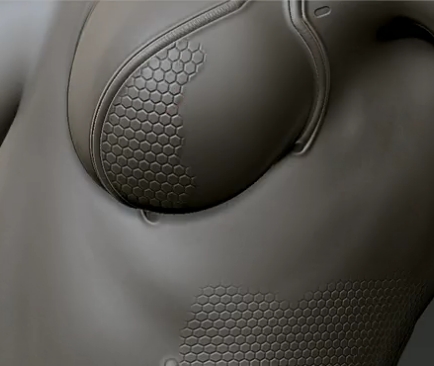
How do you create a roller brush that doesn’t change the orientation of the alpha, but lets you scribble a perfect pattern onto your mesh? I saw this done in a video snippet of “Hard Surface Techniques” around 30 seconds into the video, and it blew my mind. I would LOVE to know how such a brush is created. If you look at the video (it’s at http://www.eat3d.com/zbrush_hardsurface2) about 30 seconds in, you’ll see this:

…and notice how the brush is just painting on the hexagonal pattern, but the alpha is NOT reorienting to the changing stroke direction… it just paints on the detail without distortion. Anyone have any idea how this is done?? HELP! I gotta know!!!

Attachments
sample.jpg

I am curious about this too. I found a temporary work around so take what I say with a grain of salt, and I hope someone with better information on how to do this can come in later but…

If you go to the “Brush” menu there is an option that says “Alpha and Texture”. Under that menu is an “Align to Path” option. If you crank it to 25 the alphas position shouldn’t change. It didn’t when I texted it using a star alpha and a sphere.

I don’t think this is using a brush alpha at all. If you look at the interface, there’s none selected. I think that either a mask has been applied using UVs or the Stencil is being used in wrap mode, and whichever it is, the visibility has been turned off.

Thanks for answering, guys… I really appreciate it! I tried the Align to Path, and no dice, doesn’t work like that. BUT… I think I may have an idea… what about the morph brush? If the texture was applied using NoiseMaker or some other “make this pattern repeated over the entire surface” technique, but using morph targets, one could use the morph brush to selectively apply the pattern… or I suppose the Project brush could be used in a similar way… what do you think? Perhaps the morph/project brushes are the “correct technique” in this situation?

Hey check this out!

I’m not up to snuff on stencils so I may be way off but scroll to the bottom of this page, it may have what you are looking for:

http://www.pixologic.com/docs/index.php/Stencil_Palette

Especially the part that says:

“Use Alpha:Make St to convert any alpha to a stencil for use with tiling.Tiled stencils will be placed edge to edge, allowing you to convert seamlessly tileable alphas to stencils which can be applied over large areas without seams.
Using a tiled star alpha (converted to a stencil) to sculpt a grid of stars into a model’s surface”

Good find!