ZBrushCentral

How do you avoid this? (answered)

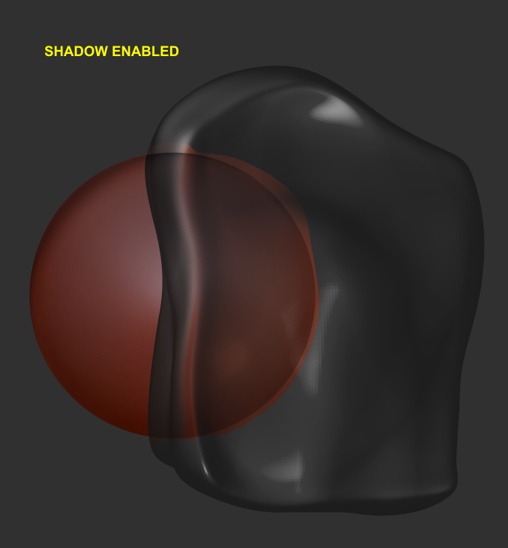
As you can see by the images below, I am having refraction problems with BPR Shadows turned on. Without Shadow, the refraction is normal, but if I turn BPR Shadow on it doesn’t refract the shading of the sphere. I messed around with everything with no results. How can I adjust render so the shading also refracts?
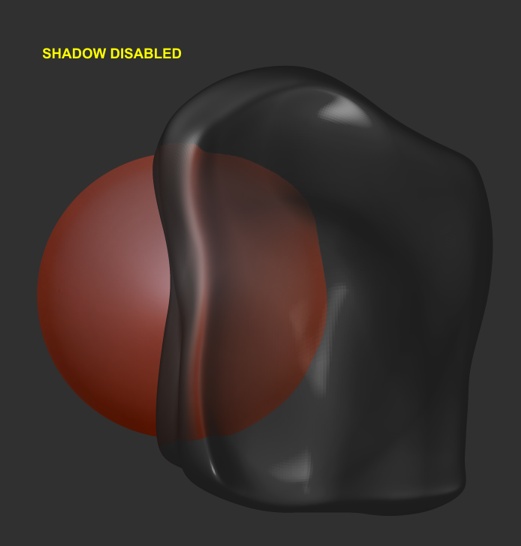
bpr shadow 1.JPG

Attachments

bpr shadow 2.jpg

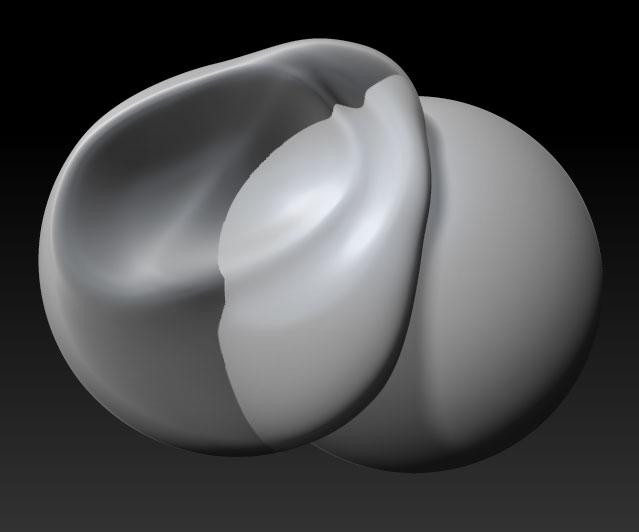
Currently transparent subtools do not cast shadows so you will need to do two renders using the Create Maps option:

  1. A render with Transparent on showing the refraction (Shadows off)
  2. A Render with Shadows on (Transparent off)

Export the Render for (1) and the Shadow map for (2), then assemble in Photoshop, using Multiply mode for the Shadow layer.

refract.jpg

HTH,

Thanks Marcus, but I was referring to the shading on the sphere and not cast shadows. The shading of the sphere is not refracted when I enable Shadows in the Render menu.

EDIT: I will edit my first post and replace shadow with shading.

So, is this a bug with BPR then?

It’s a limitation, as far as I know. And anyway, if transparent objects don’t cast shadows then you will not get accurate renders out of the box as the shadows on the refracted object will not be accurate, even if they were refracted. There are no caustics either, so you will have to find a working method that gives you the result you need. BPR is a new feature that will have more features added to it in future releases.