ZBrushCentral

How do I keep my data centered in space?

I am sculpting automotive sculps, and I need to keep things centered on the grid that I start on. When I am transposing (scaling only) the sphere to get started it seems at times it gets shifted from its center, making life a pain to get a good final result.

I am VERY new to zbrush, but want to learn fast and well… so I am jumping in as deep and as fast as I can.

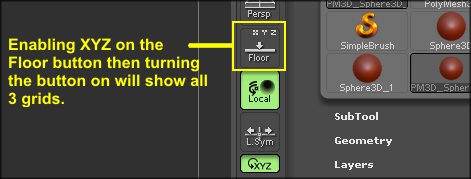
Is there a way to snap the math to a center grid, and/or to show all the grids in space?

Going to ‘Tool > Deformation’ and clicking ‘Unify’ will centre the subtool to 0,0,0 but, it will also scale the subtool to the ideal size for ZBrush. If you want accurate transforms, you should use Offset, Size and Rotate in the ‘Deformation’ subpalette. Clicking on the slider name will produce a red box which will allow you to enter numeric values, even decimal values for fine adjustments. Offset and Size are just generic values, as ZBrush doesn’t really use real world measurements and Rotate is in degrees. HTH

new-3.JPG

For more Grid options, see Floor Grid .

I love you guys… as great a program as Zbrush is, the community is even better!

Since you are new, here’s another method if you are bringing in your base meshes instead of creating them in ZBrush.

Make sure that in your 3D host app (Maya, Max, etc) that your objects have all of their transforms frozen and the pivot zeroed out to the world 0,0,0. This will ensure that all your objects are correctly scaled in ZBrush and if you export things from ZBrush they will align properly when reimported to the host. It will also make sure that your maps are generated properly based on object scale.

I didn’t know this when I started years ago and it drove me nuts. Just make sure the scale, translation and rotation have all been frozen. In Maya you use Modify > Freeze Transforms and then Modify > Reset Transforms. Also check to make sure you delete the history on your meshes so there are no extraneous nodes that could mess with OBJ creation.

If you need to maintain these things in your host app, just make a new scene and freeze all the stuff for exporting.