I’m not sure why there are holes in my normal maps. It seems to be appearing in all parts of my model. I checked to see if the UV’s were merged and they were. Any ideas?
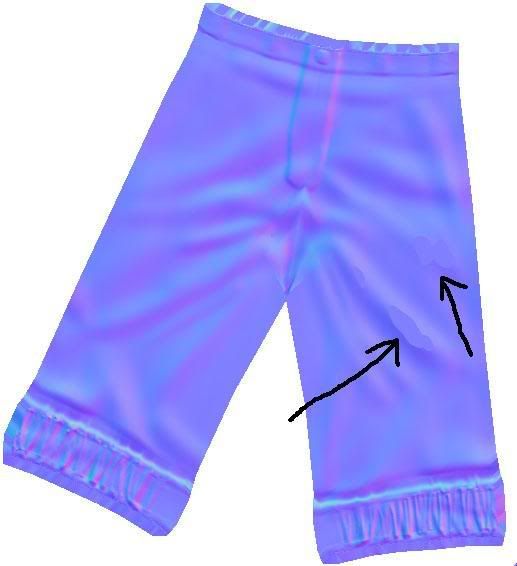
I’m not sure why there are holes in my normal maps. It seems to be appearing in all parts of my model. I checked to see if the UV’s were merged and they were. Any ideas?
As you are using the Raytrace method (found under the Normal & Cavity Map tab) to calculate your normal map, some areas may be out of the rays traveling distance. Increasing the Raycasting Max Scan Distance will increase the calculation time but also avoid the “holes” you are seeing. You can find the Raycasting Max Scan Distance slider under both the Projection and Misc tabs.
Hey Thanks TVeyes,
I just figured that problem out today and wanted to let everyone know the problem has been fixed incase they ran into a similar problem. I never knew you responded.lol
I changed from raytrace to interpolation and the problem went away. So…I figured it had something to do with raytracing so I messed around and remembered soemthing to increase its Scan distance. It worked!
Maybe this will also start solving some of my distortion problems too.
Is there a book that goes really deep into zbrush’s zmapper? Or something similar? Anyhow, thanks for the help. 