ZBrushCentral

Help with Topology/Exploding Polygons

Hello everyone,

First of all it should be said that I’m a complete novice at any kind of sculpting, let alone 3D. I’ve only been using zBrush for a few days (birthday gift from my rather rich mother) so it’s no wonder I’ve run into a few snags. For the last few days I’ve been doing nothing but watching the zClassroom videos and tutorials on youtube, and so far they’ve been very useful.

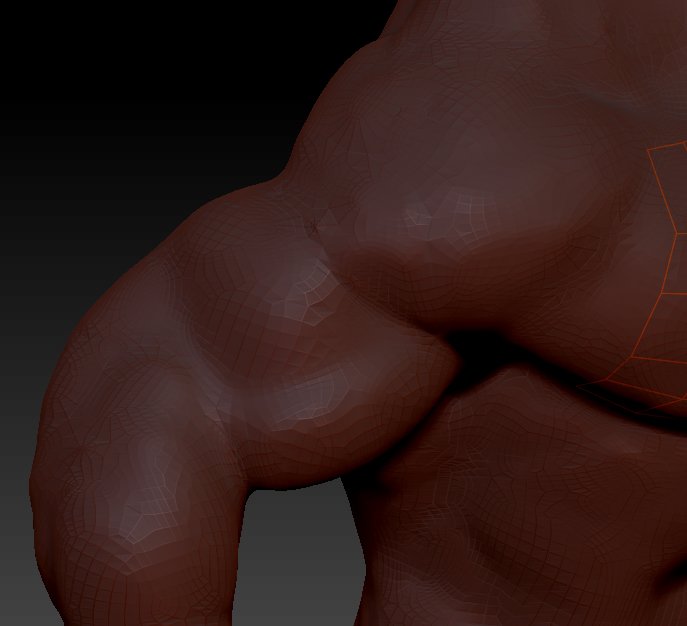
However, here is my problem: Today I started the rather ambitious project of modeling a full figure. After getting something I liked with the zsketch thing I started sculpting and noticed these difficult spiderweb-type patterns emerging in the verts (see picture 1). They’d persist under a clay brush and explode if smoothed or over-worked.

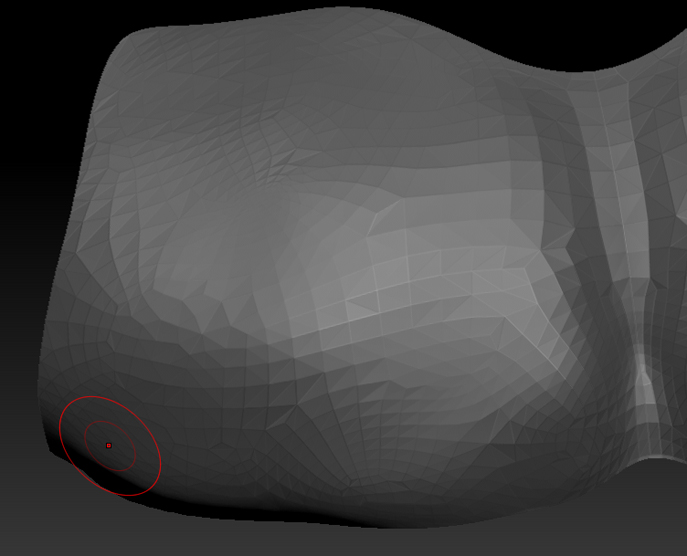
After a few more hours on the internet I think it’s a topology problem, so I set about retopologising it (also picture 1, on the chest). However, after doing so, the preview shows the new topology to be much the same. (see picture 2). Or is it better?

As I said, I’m a complete novice. At this stage I’d like to continue sculpting but those spiderweb areas are proving very difficult to work with. Any help would be greatly appreciated.

Thanks in advance, guys.

P.s. Side note, I’m not even sure what retopologising does or why it is so important, only that it is. I don’t like being ignorant so if anyone could tell me more I’d really appreciate it. :slight_smile:

Attachments

BigBody1.jpg

BigBody2.jpg

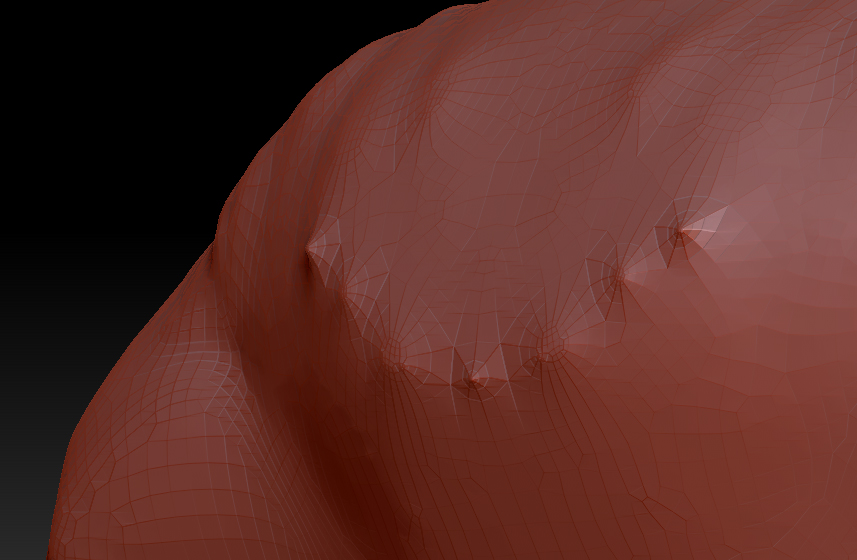
Here’s another shot on his back. These are particularly stubborn - when smoothed they tend to erupt in random directions.

Attachments

BigBody3.jpg

Hey there,

as you’ve said yourself … quite an ambitious task. But do not fear. Looks you are doing just fine. Now before even thinking about retopology, you should sculpt all the major forms and landmarks. Just Subdivide your model again (and again and again) by going to Tool/Geometry/Divide and you should be able to sculpt a lot smoother until you get to a point where only the fine details are left to do. Now this is the point where you could do a Retopo (Meaning that you can create an edgeflow that exactly follows your sculpted shape, which will give you a model with less Polys and a clean flow)

Just check the ZClassroom and the wiki and you should be ok.

Hope that helps.

Alright man, thank you. :slight_smile:

I’ve been playing around with a backed-up version and discovered if you don’t really pay attention to them (and keep subdividing) they’re not much of a problem. Perhaps I’ll post a WIP in the (correct section) of the forum once I get to the retopo phase.

Thanks again for your help and explanation!

Just a little piece of advice, as you are sculpting on a unified skin … stick to the clay (or clay tubes) brush and be careful when using smooth. Especially when trying to smooth out poles (those “stars” when 5 or more edges connect to one single point). Change you smooth brush to Smooth Valance when trying to smooth there.

Will give that a go mate, thank you :slight_smile:

What’s the difference between unified and adaptive skins?

Well the unified Skin is basically a cubic projection of your model. Just think of 1000’s of little cubes falling into place where there should be :slight_smile:

Basically it’s Voxel technology.

Adaptive skinning is linked to ZSpheres, as it produces a topology that follows the ZSphere creation.

Hope that helps.

I just looked up voxel on wikipedia, hah. Interesting stuff. :slight_smile: Helps me understand what I’m working with a bit more. I’m having a lot of fun so far just messing around and experimenting.

Thanks for all your help man!

When smoothing, use shift to enter smooth, but while still continuing the stroke release Shift. This turns on the alternate smooth algorithm which is supposedly slightly slower on dense meshes, but handles those high-valence points better.

Shift->BeginStroke->ReleaseShift->continueStroke.

There is also a smooth-valence brush in the brush menu. Shift-click it to make it your default smooth. It also handles high-valence points better.

Wow, yeah, that works a lot better. Thanks as well! All so helpful here :slight_smile:

I like the polish brush. Setting it too high or pressing down hard will tend to flatten out. It isn’t doing the same thing as smooth, but it is giving a smoother surface. You might try that on difficult areas too.