ZBrushCentral

Help with Texture from Polypaint error

Hi all.
I thought I would run this one up the flagpole with the community.
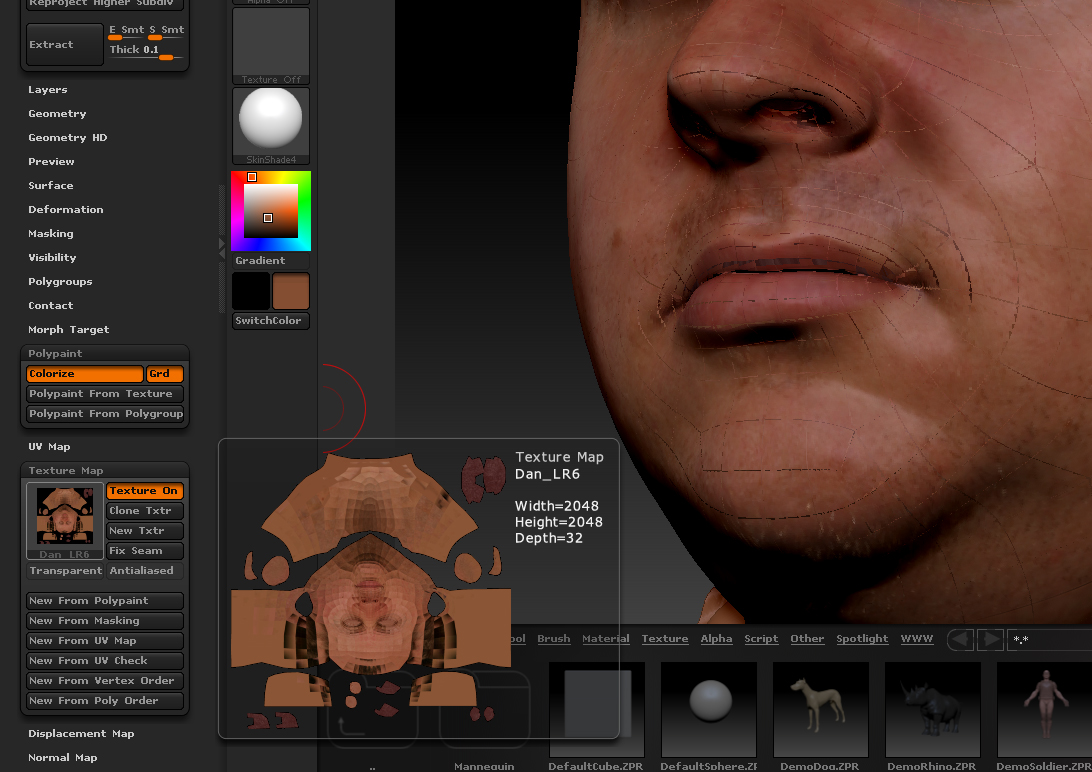
I am having troubles with baking polypaint to a texture.
I get strange wireframe bake into the texture, and it appears all faceted.
Any ideas on how to fix this ?
Cheers

Attachments

ZB_error_01.jpg

Im having the EXACT issue.
This happened to me once before and I could not resolve it
I had to toss the model.
Help!

Its an issue most likely to do with exporting your original mesh from zbrush that has good uv’s.
In your export settings in ZB you might have turned on “mrg” (merge uv cords)
If you have this turned off and export. . the models uv’s will get screwed up. it might be the other way around.
Just play with this and see what happens.
Also… re import your original obj file in at base mesh level before and see if that fixes it. doing this can sometimes fix it … or stuff it further.
A lot of the time I have to bring in the original clean mesh obj i started with before zb corrupts it.

Also… Open your obj you use in 3D Coat !!! and display UV … This program is EXCELLENT for displaying what your UV’s currently look like.
Hope this helps.
Write me back if you solve or dont solve this.
Glad to help… i hope
Glenn,
thanks for your help. Alas, it did not work for me.
But I solved it -
Here’s what I did:

  1. I imported the .obj base mesh into the zb subtool, (the problem child), and I had the same problem - flipped polys.
  2. I worked with a fresh import of the .obj file as a new project and everything worked great - so, problem was not with the base mesh from max.
  3. I appended the base mesh to the problem file and projected polypaint and sculpt to the new subtool.
    Voila! everything worked.

What is curious is the “problem subtool” seems to flip each individual polygon.
I will look into the import export preferences with in Zbrush as well.
Thanks for taking the time to help me out.
Best forum ever.
Jinda