ZBrushCentral

Help with saving a model - Noob Alert

Hi everyone,
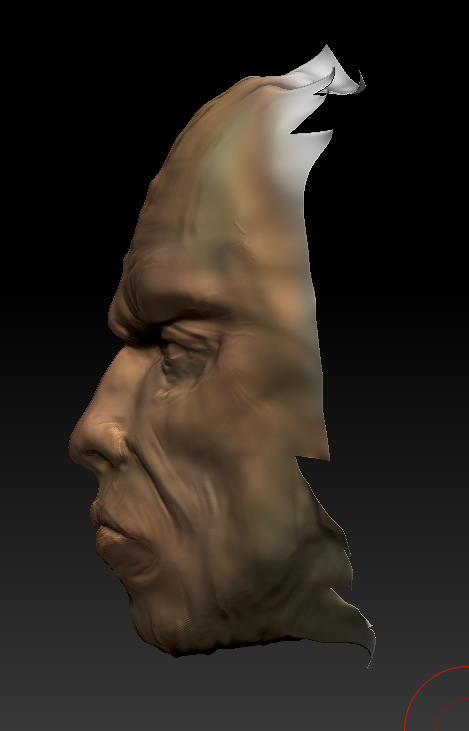
I’m a pretty big NOOB with Zbrush and 3d but I started seeing what I could do the other day assuming I wouldn’t have anything worth keeeping I just start with a 3d Plane. Well, as I got to a certain point it looked like it was actually worth keeping but now i’m stuck with a ‘half’ model and not sure how or IF i can somehow save this. Does anyone have any suggestions on how to save the model by merging it maybe? Again i’m a noob so I’m not sure what options I have if any. If not, i’ll start over and chalk it up to learning.
Thanks for your help.

Attachments
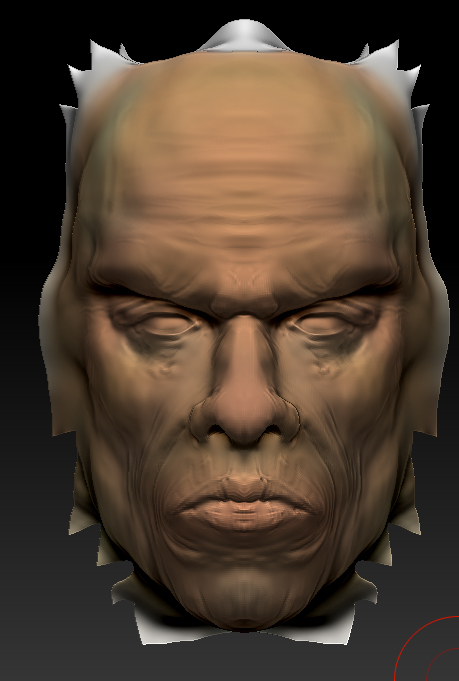
Screen-shot-2010-09-19-at-12.32.35-PM.jpg

Screen-shot-2010-09-19-at-12.32.41-PM.jpg

i think it’s harder to completely understand what you’re working with without a picture. I’m not so sure what it looks like or exactly what you’re trying to do when you mean save it.

Are you asking about projecting your work onto full geometry so you can finish the entire head, or do you want to put the project away “as is” and finish it later on the plane you started with.

You can save it as a tool, or save a project or “project” your details onto a properly set up sphere (for example), but perhaps you can clarify what you need.

Sorry about the pics, I thought I posted them the first time but they are up there now.

Nancyan - I think from the sound of it ‘projecting’ the details on to a set up sphere is exactly what I’m looking for. Then i can do the back/sides etc. Any help would be greatly appreciated.
Thanks again

There is a section on Sub Tool Projection in the ZBrush4_whats_new.pdf in your ZBrush 4.0/Documentation folder. Starts on page 63.

Also see this thread.

There’s alot of info on the forum, the docs and free videos on the web re: projecting detail. There’s a zproject brush and there’s “projectall” as an option with tweaking settings in the subtools palette. Its a bit ahead of my level of expertise for me to explain, but again, this points you in the right direction for study.

Additionally you can “stitch” one piece of topology to another with the retopology feature. Lots of people detail hands or ears, for example, seperately from the main model and attach them later. There is a video or two that explains this technique on Youtube…later I’ll see if I can dig up the link.

Here’s the video link to stitching parts together via topology tools

http://www.youtube.com/watch?v=ifnGYk4jmHQ

Great! That helps out a lot, now I know what to search for with terminology etc.
Thanks everyone!

Yes, you can do many things with your nice face model.

#1- merge it onto the demo soldiers head, #2merge it onto a manniquin, #3 use it as a mask #4- append a zsphere sketch and continue skulpting a human figure . In order to clean up the edges, you could mask only the desired portion, and select “from masking” in polygroups , and then “split group”, and delete the unused piece. Shep.