ZBrushCentral

Help! What am I doing wrong?

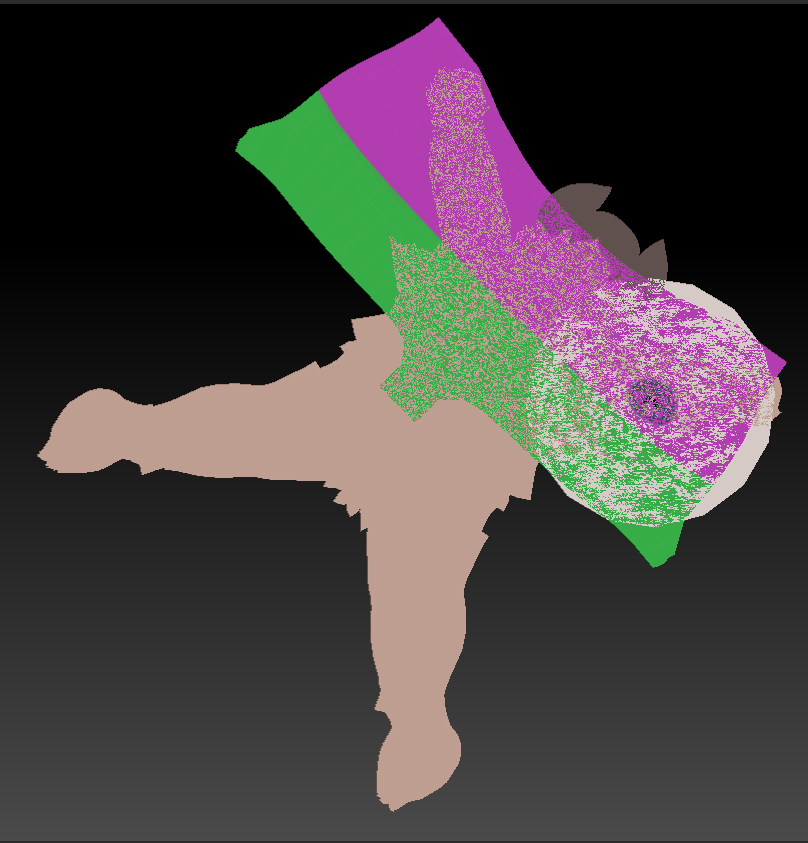
Hi, I’m trying to merge 3 subtools together with their UV’s to obtain a single obj and UV texture map for export. I used ‘merge visible’ from the subtool menu, with ‘UV’ checked, and I’ve also used Multi-map Exporter but in both cases I get the UV images compacted one on top of the other. Please could someone tell me what I’m doing wrong. Thanks.

Attachments

UV texture.jpg

I’m not sure but found you this…http://www.zbrushcentral.com/showthread.php?182475-Multi-subtool-all-in-one-texture-map&p=1059394&viewfull=1#post1059394

In Zbrush when using UVMaster on each subtool it will create UVs trying to fit the maximun space in 0,1 . If you merge down while keeping UVs they will not get rid but they will just overlap over and over in the merged tool.
If want you can edit the UVs and scale each island when you are in Flatten mode in the UVMaster plugin
Other thing you can try in the UVMaster is by checking the “Use Existing UV Seams” and press Unwrap on your merged tool.

The multimap exporter has an option to export all the UV maps merged in the same map. But this doesn´t mean it will rescale and fit all your maps into one map. This means if you have the Tool splitted in different subtools with all UVs done and not overlapping it will export a merged image with all maps from all subtools and you don´t need to merge tools or merge images in 2D editor to have a single map.

Hope this makes sense…

if you can keep the merged tool as 3 groups and have 3 separate textures, then the UVs will work as they are.

hide 2 groups leaving one visible, then click “new from polypaint” or “new from UV check” and you’ll get a texture in the shape of that group’s UV.

Thanks for all your responses guys! If I save out each map as you suggest Zeddie, how should I then export the mesh, through the main Export menu or via Multi-Map - and if the latter should I check under the Create all Maps button, the 2 boxes below, sub tools and merge maps? When I import the merged obj into Octane the program only asks for a single map, not the 3, and it spreads that one map over the entire obj, so the obj doesn’t appear to have all the maps assigned to it. Also, Fran, when I clone and export each texture map, I’m asked whether or not I want to save the material-index as a separate channel. Please could you advise.
Many thanks again, David

i don’t know anything about Octane so can’t really help you there. i’m pretty sure you should be able to apply more than one texture though. i also don’t have too much experience with multimap exporter.

in theory, you could export the mesh as a whole, as an .obj via “export” while the mesh is grouped in 3 parts, then export the textures separately.
then in an external program import the obj, select each section and apply a texture to each.

a problem i run into with that is sometimes other programs don’t recognize zbrush’s groups.

another work flow could be to export them in separate parts. make one group visible and export as obj, do the same for the other two groups. then import one at a time into another program and they should line up perfectly.

if you have already made textures while they were separate and that’s why you need the same UVs after you merged.
you could apply those textures to each group as previously stated, then turn those textures into polypaint. then unwrap the object with new UVs and then convert the polypaint back into a texture. that way you can have one texture for the whole object.
This happens when you Fill your object with Zbrush material information. It will ask if you want this in a separate channel. You can find the channel when openning the file in Photoshop in your RGB channels

Thanks for all your input guys - it’s really helped. However, in the end I had to bite the bullet and discard my textures. It seems that I didn’t have sufficiently low subD levels and when I tried to UV the merged objects, about 1M poly’s, and Zbrush just fell over. So I did a decimation followed by a merge. The UV’s then projected the various polygroups without overlap on a single texture. Happy bunny at last!