ZBrushCentral

Help on Complex Patterns on 3d Surfaces

Hello all,

I am looking to better learn how to apply patterns to 3d surfaces.

While in Mexico was inspired by the intricacy of the patterns and how they flowed so well with the surface areas - Alebrijes .https://www.google.ca/search?q=alebrijes&source=lnms&tbm=isch&sa=X&ved=0ahUKEwi_y9rYzovLAhVjkYMKHY7EBDEQ_AUIBygB&biw=2000&bih=1210

A specific example can be seen here:
https://s-media-cache-ak0.pinimg.com/564x/9a/8b/7e/9a8b7eeeefb524d4031685b56d3981a6.jpg

I have created uv maps for the sculpture and now want to start creating similar patterns.

Would anyone have any recommendations on where to start? I have searched the web for any tutorials but have come up short for a project such as this.

Specifically I would like to know how to place a pattern along an editable path.

Look forward to hearing your resourceful and innovative ideas.

Eric

Attachments
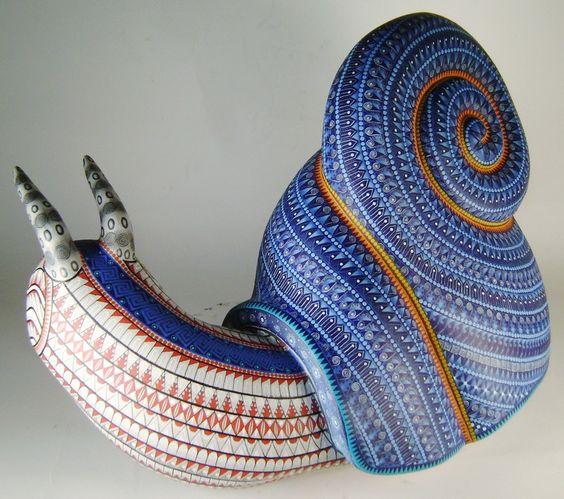
9a8b7eeeefb524d4031685b56d3981a6.jpg

Using standard brush with only RGB. If we set a texture and then activate the roll option you can draw a path pattern. You can not change this path once done. There are multiple settings to tune this in the stroke section. I would use layer to have more control as you can delete partially RGB layers with ALT.

Keep in mind that in Zbrush 0,0,0 color is transparent. You could have a base color in the layer 0 and then draw the patterns in other layers with this alpha effect to avoid overlapping other patterns. That would reduce errors that appears in my example.

You could use curves also but I don’t think they give the same kind of control.

Image 1335.jpg

Thank you Altea looks like this could work for me. I’ll also try painting directly on the uv map to help with direction according to form - not sure if that will work.

Appreciate your help on this!

Eric

This is polypaint, unrelated to the UVs. Obviously good UVs will be needed to export the polypaint.