The displacement map for my creature causes the polygones to explode. Does anybody know how to fix this. ( i was rendering in maya) 
Attachments
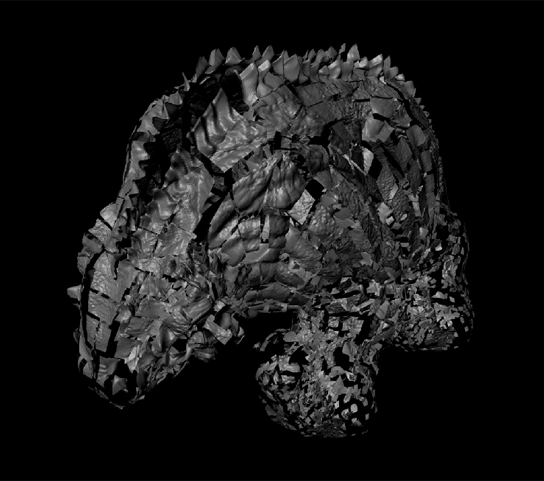
The displacement map for my creature causes the polygones to explode. Does anybody know how to fix this. ( i was rendering in maya)
Are you sure the UV’s are still ok? Zbrush on export can sometimes re-order the vert numbering causing the exported maps to becomes messed up. Or the maps can look ok and the UV layout ok but when you test which verts are connected to what they are mis-aligned. I would first check your character with a checker map again. IF that is ok then check in the UV layout that the verts are actually connected in numerical order. if both of those things are ok then its just the way the displacement is being calculated. But by looking at your render it looks to me like you have the vert numbre issue as you can see polys breaking away on their own in displacement which can only happen normally if there is a dis-connect in your uvs or maps.
hope it helps.
It’s strange because when i export it from zbrush with GoZ, i am not getting the bug. This only works when i also send the displacement map with GoZ. Otherwise i get the bug.
Since it works with goZ, then it could be that you are missing some settings in Maya. When Zbrush sends your model to Maya it sets up several things for you.
You need to set the correct Alpha Gain and Alpha Offset values in Maya manually, if do not use goZ.
When you goZ your model to Maya, click on the displacement map in the Hypershade and look at the attributes editor, under Color balance you will see two values-- Alpha Gain and Alpha Offset. These values are very important for proper displacement of 16 bit maps. If you do not use goZ, you need to get the Alpha Gain value from the the Zbrush alpha palette–Alpha Depth Factor. The Alpha Offset is negative half of the Alpha Gain. For example if your Alpha Gain is 0.030 then the Alpha Offset should be -0.015. You have to make sure that the “Alpha is Luminance” box is checked. This is the check box under the Alpha Offset.
You also need to flip your texture vertically for Maya as compared to Zbrush.
In addition you need to create a mentalraySubdivApproximation and set its values.
Hope this helps.