ZBrushCentral

help making sub tools flush.. Please help

this is my first post please be nice. i am supplying a picture to give you a better idea of what i am asking. in the picture you will see the head is transparent and the teeth have unwanted geometry and bulk that i would like to get rid of. more less, is there a way to make these items flush with each other without merging the 2 sub tools together? I have been Zbrushing for almost 9 months and i know there is probably a number of ways to this, but with my physical handicap, and inability to use a tablet, i find myself running into this problem a lot

I study this program almost all day and have a digital tutors subscription, but this is one thing i run into a lot. any helpful answers will be greatly appreciated. Thanks have a great day everyone

Attachments
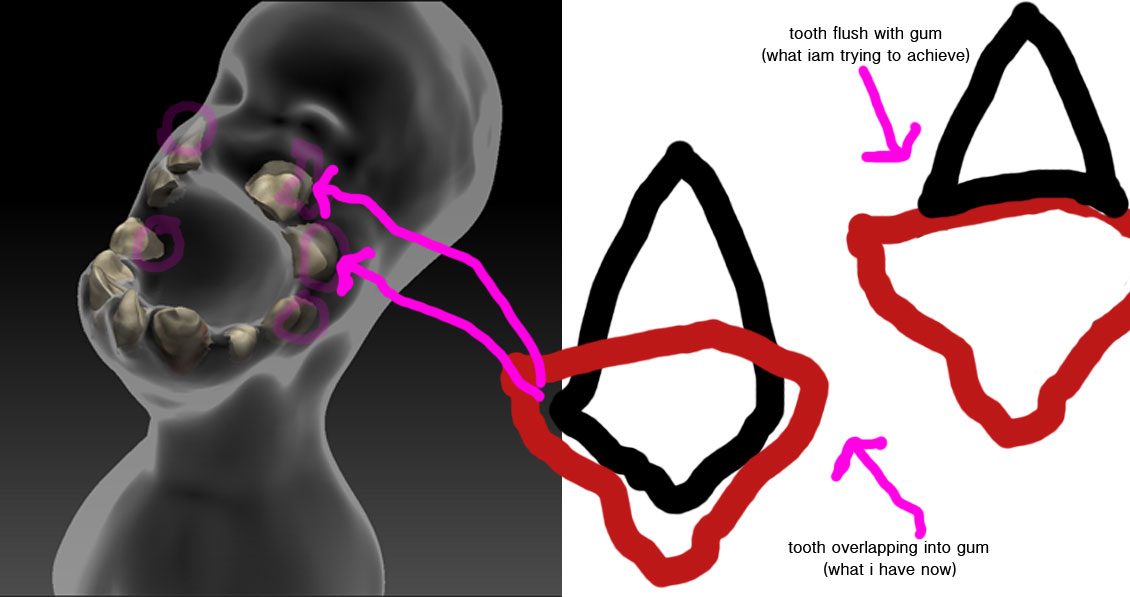
Zthread.jpg

Therenreallynis only one way to achieve this. You need to DynaMesh the teeth, then use a copy of the head as a subtract Boolean.

My question is why do you want to do it though, there isn’t a problem with them overlapping.

Thanks a lot Gordon. I figured that dyna mesh subtraction would be the only route however, I never thought about it the way you described it. so thank you very much. In answer to your question, I didn’t want to separate the teeth from the head as a sub tool because i have a hard time poly painting without it bleeding into the head mesh. I know there is a million ways to do this, and i have been following Joseph Drust’s videos that cover dyna mesh subtraction so i am familiar how to do that.

As far as the overlap goes I wanted to do my final render in lightwave and i wanted to have the maps created from the poly paint and i didn’t know if having jagged edges would effect my map and/or importing into lightwave.

Thanks again for the answer whether or not it is necessary for problems with goZ, the method you described is way better than the way i was going to do it. Thanks again Gordon.