ZBrushCentral

Help 3dmax 2008 to zbrush

I wasn’t sure where to post in here so sorry if i posted in the wrong place

Hey, i was wondering if anyone could help me out. I’ve doing some research before i decided to post somewhere my problem.

I’m experiencing this problem, i sculpted this head. Retopologyzed it. Exported to Max 2008, layed the UVs. But when i import it back to Zbrush, i get this wonky problem. My model seem to shrink in size and when i go up subd levels it all explodes.

I’m posting this screenshot to see if it could possibly help. I’m almost sure i had checked mrg and not grp in the exporting settings while exporting. But in any case i could run both if that is actually part of the issue.

If anyone can help me out, i’d be very grateful.
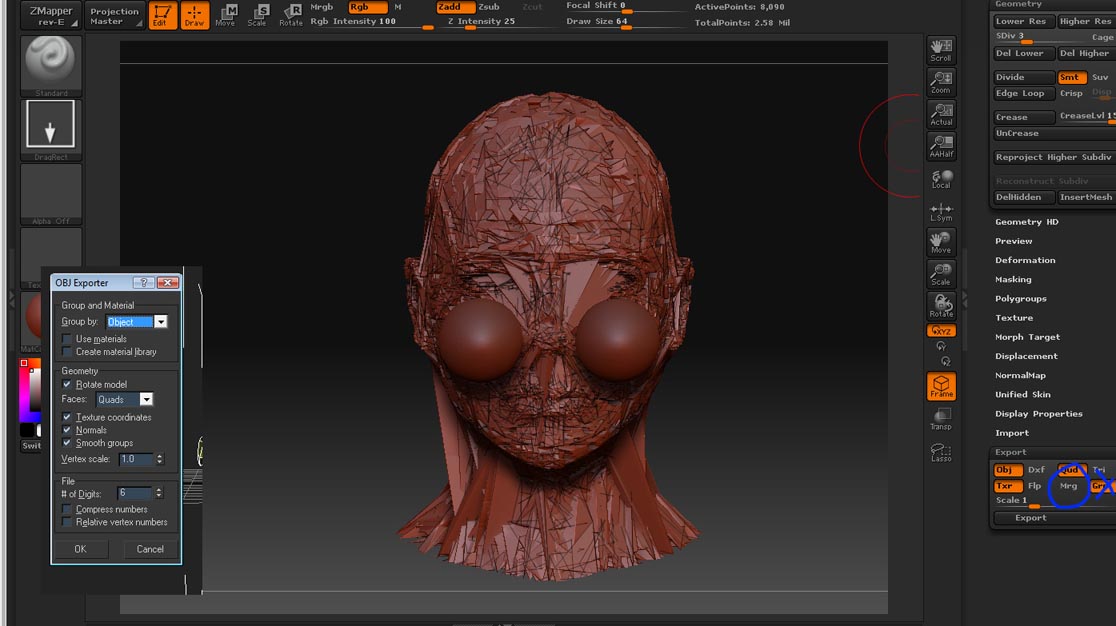
export_problem.jpg

The problem you are having is very common, and probably happened to over half of the ppl on this forum. There are various threads about it and ways around it.

http://www.zbrushcentral.com/zbc/showthread.php?t=59918&highlight=exploding+mesh

That one has good overall info

http://www.zbrushcentral.com/zbc/showthread.php?t=47891&highlight=exploding+mesh

Another thread regaurding exploding mesh’s.

Just off the top of my head the most common fix is to import your model with correct UV’s (the exploding one) and subdivide it to match your high rez model. Then with only the new mesh and the detailed mesh showing, use project all. There are settings you can mess with if you dont like how it comes out.

Hope that helps, I know how frustrating it is to lose hours of work due to some stupid error.

Thanks Aberrant

at the same time i’m glad this is a frequent problem people experience i’m sad cause this shouldn’t be that troublesome. i’ll try some of the suggestions on those threads soon and post it back

ok so i just had this epiphany and tried to export my lowest subd mesh as .obj inside zbrush, and instead of bringing it to max i just imported the single .obj file zbrush gave me to my lowest subd. And i get the same problem!

Anyone can help? turns out the problem might not even be max’s fault.

Very weird, although I have heard of that issue as well. What settings did you use for export?

Another thing is when you import a mesh, sometimes the scale is off, once you append it to your other sub tools it will inherit the scale of the top most sub-tool and scale should be correct.

I would try this, go to level 1 and store a morph target, then bring in your new mesh with UV’s and go down to morph target and click swap, this should allow you to crank up your sub divisions without exploding. Hope that helps, give me a bit more info on your steps and export settings and I will try to help you out as best I can.

Aberrant

so here is what i have done now. I have exported my obj in SDiv 1 and in the Export tab i checked Merge UV cord and unchecked Group Sub groups. to a file called zbrush_export.obj

i imported zbrush_export to my sdiv 1 and it explodes.

but if before i import zbrush_export i store a morph target and import it and press switch my mesh runs ok. no exploding

after that i have taken my zbrush_export to 3dmax and layed the uvs, saved it as an max_export.obj and imported it to zbrush. and i get exploding mesh even when i store a morph target and press switch

in max i have tried using diferent settings, tried polygons and quads in the face settings and both explode my mesh.

Ok, thanks for the info. So here is what I would do. You are exporting correctly, merging UV cords is important (so every polygon is not seperated).

When you export your mesh from 3DS Max, are you using the zbrush export preset? (this is in max 2009 and newer). If not, I would try that and see if it works. If you do not have that option or it doesn’t work out I would try the following.

Load your original tool with all your details, then click the polymesh tool and click import. Import your base mesh with UV’s.

Now go back to your original tool with all the details, go to sub-tools and click append button. Append the base mesh you just imported.

Take the base mesh and subdivide to match the high rez (EX: 6 subdivisions on both).

Create a morph target for the highest subdivision level of the base mesh (the one with fixed UV’s out of max). This will come in handy later if there are any artifacts or unglyness.

Then under the sub tool menu, with only the base and high rez sub tools showing (hide any other subtools you may have) and click project all. If you have any polypaint make sure you have both RGB and Zadd at 100% (if RGB is off it will not copy the color info)

You can now use the morph brush to fix any problem areas. The smooth brush is usually what I use to fix any small errors, and the morph for any large defects.

Hope that helps. Post back and let me know how it goes.

Hey Aberrant, thanks for your help a lot.

I haven’t had the time to go through the process you suggested just yet. But i’ve been experimenting with some other meshes and i found out that i can go from max to zbrush ok. You have to save your obj file, reset max, open it up again and save it over itself. it’s bizarre weird but it works that way. Not to this particular mesh i was having trouble with, so i figure there is some problem with it. i will try to run over what you suggested and after that retopo the mesh again to see if it fixes my problem.

I’ll post back again in the near future with the results

maozao I am glad to hear you are experimenting with other mesh’s. sometimes when you get stuck on a technical issue it makes you lose motivation.

Before you try my method, I would STRONGLY recommend you retopo FIRST if you do plan on retopologizing.

I would also do your UV mapping as you retopologize.

The reason for retopologizing first is to save yourself from repeating steps, as well as some time. If you retopo after projecting, you will have to project again on the retopologized mesh.

Hope that is helpful to you and saves you time. Have fun!