ZBrushCentral

Having some serious issues with this program

I already know how to do a lot of things like masking, polypainting, alphas, normal maps, and all that, but there are some basic things about this program that I don’t get and are different from other programs.

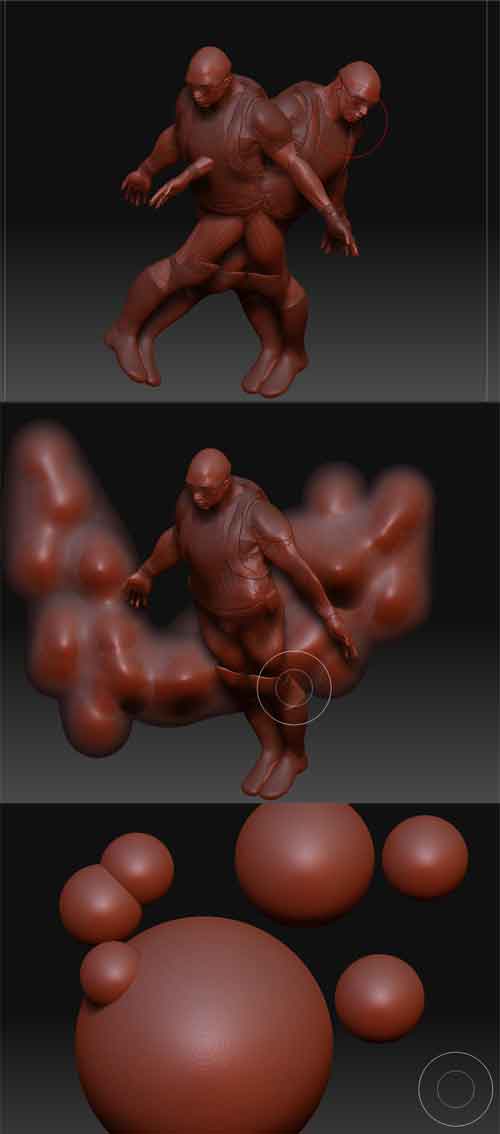
  1. So I’m making my sculpt and I’ve appended a few objects and they are in my subtools section under tools. Now I save my work and for some unexplained reason I get a clone of all… just look at the first part of the image I uploaded- that happens. I get two copies of my work and no matter what I do I can’t do anything to one of the copies. What is the point of saving a document if this happens?

How can I get all my appended subtools to be like the demo soldier, where I just open the program and there it is in perfect condition? Because obviously saving the document does the opposite of saving.

  1. After the document is saved, I close the program and open it up and you can see the middle part of the image. I can’t use the subtools anymore, just painting.

  2. The third part of the image shows a bunch of spheres. Why, oh why, can’t I just select any of those circles and work on them? Why is it that only the newest subtool can be put into edit mode? If I put down 10 circles and undo, all those circles I made cannot be put into edit mode- nothing can be done to them.

EDIT: Thank you very much Eldee and Moni. Thank you so much for those links and recommending those plugins! Zbrush is a daunting program for beginners like me and helpful people like you really make the learning process easier!

Attachments
zbrush-issues.jpg

sooo… on step 1, are you saving the TOOL, or are you saving the document? The document is pretty much nothing. Pixologic hangs on to this belief that there is a huge market for 2.5d painting, but everybody uses ZBrush for sculpting 3d models, when you save- make sure you save the tool, not the document. Thats pretty much it… if you create a polysphere and append it to your main tool (as a subtool), you can save the tool and each time you open it, the subtool will be there.

Ohhh, I get it. So the document is for that 2.5 painting business. Thanks a lot!

Hi Avery J Johnson,
I try to answer some of your questions. (Beware – many links inserted :slight_smile: ).
Regarding the first picture – I don´t know what happened, I´ve never seen this before, but there´s something really important in general:
The Document-Palette does [color=cyan]NOT save or load your 3D model.
Use Tool > Save as
or better >SubTool Master> Save ZTL.

Just in case you haven´t the SubTool Master Plugin - download it! :wink:
It´s kind of a must have! :slight_smile: And it makes life easier. :+1:
Just check out the infos and you´ll see it´s very helpful for many other different things, too!
Infos + Download-link here:
http://www.zbrushcentral.com/zbc/showthread.php?t=057154

:white_small_square: Info: Document–Palette
http://www.pixologic.com/docs/index.php/Document_Palette
:white_small_square: Info: Tool–Palette
http://www.pixologic.com/docs/index.php/Tool_Palette

And you said that you can only paint?
There are two important things:
As eldee and I mentioned before – you can´t save your 3D model as document ( seems like this is the main problem) .
Remember: If you try to save the 3D tool as document, Zbrush saves only a 2.5 D snapshot instead.
Therefore you can´t edit it anymore like a 3D tool.
Another important thing : If you want to sculpt – your model MUST be in 3D edit mode.
[color=cyan]“ZBrush has two major modes, a paint mode that operates on the canvas, and a 3D Edit mode that operates on 3D models. These modes complement one another and can interact with one another, but they are quite distinct. In addition, each mode can have one of various submodes active. The complete set of mode controls can be found above the canvas area”

Here are a few links which will definitely help you to understand the differences.

:white_small_square: Info: Zbrush Modes
http://www.pixologic.com/docs/index.php/ZBrush_Modes
:white_small_square: Info: 3D edit mode
http://www.pixologic.com/docs/index.php/3D_Edit_Mode
:white_small_square: Info: Paint mode
http://www.pixologic.com/docs/index.php/Paint_Mode

:white_small_square: And here´s a link about SubTools:
http://www.pixologic.com/docs/index.php/Subtools

Unfortunately my break is over but I hope all the links will help to answer the most of your questions and solve some of your problems.
And never forget to check out the ONLINE-DOCUMENTATION
(where all the links above are from :slight_smile: ).

http://www.pixologic.com/docs/index.php/Main_Page

And last but nor least: eldee.s, I use Zbrush for 3D AND 2.5D and I know many other members, too.:wink: