ZBrushCentral

[Having problem] Can't fit holes on the mesh

Hello guys,

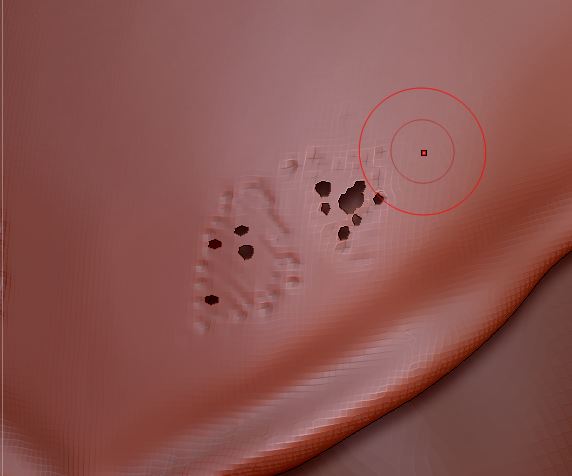
I’m having problem while sculpting, that’s when I re-dynamesh there will the holes appear on the mesh.
I tried many ways to fit that holes but it doesn’t work at all.

Has anyone seen this problem before please help me :cry:?

Thanks for your attention,

Attachments

trash.JPG

This will happen if your mesh is VERY thin, there are a couple of things you can do, one is enlarge your mesh a LOT, you can do that in two places, the first is the Geometry Pallet under Size, the second is in the Deformation Pallet also using Size (this can be unstable however, if it suddenly seems to UnDo it self, save your work, and restart ZBrush. This usually happens after more than one resize).
The other thing you can do is use the Inflate Brush to blow up the holes and then Re-Dynamesh, this will only work well if your mesh isn’t going to wind up too thin again, so the resize thing comes in handy one way or the other.

Hope that helps!

Cheers!
Mealea

Oh, one other thing, the best place in the world to ask for help is this section of this forum:

http://www.zbrushcentral.com/forumdisplay.php?101-Other-Questions-And-Troubleshooting-Forum

Now I understand the reason why this happens.
I go to Deformation and increase the inflate slider and it works like a charm.

Thanks for the link and your help :).

Im glad that helped!
Watch Inflate though, it does more then just make things bigger, it also distorts a bit.
The Inflate Brush does too obviously but its more specific.
Another way to avoid this problem can be to use higher density settings for Dynamesh, sometimes a setting of 256 will not do this while a setting of 128 will. This has effect of making a lot more polygons as well and is not always the best way to go about it.