ZBrushCentral

Hard surface workflow

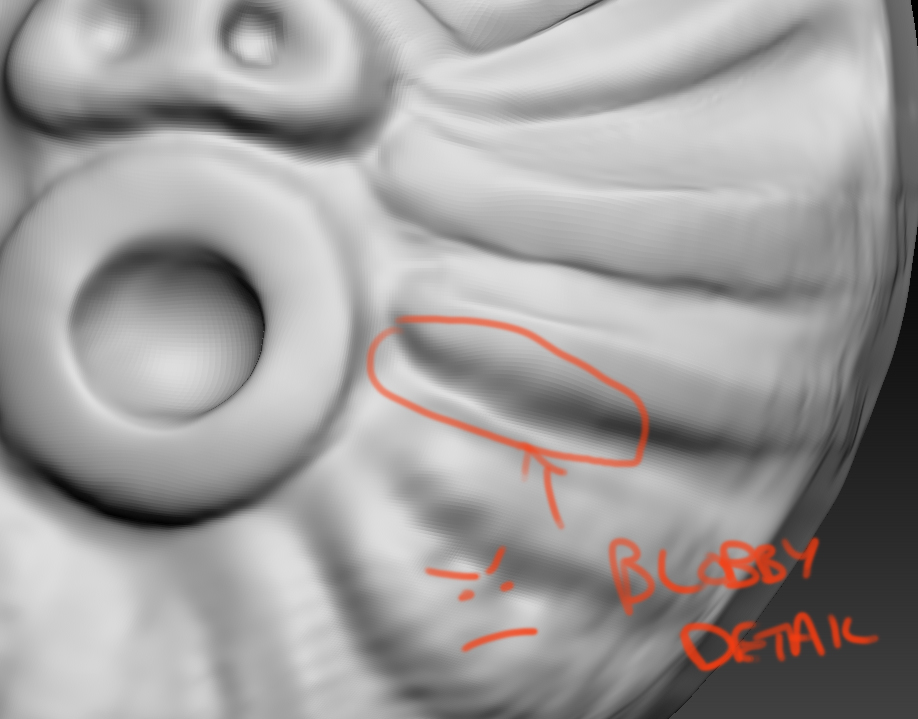
Hey everyone, I’ve been messing around with a few of the hard surface brushes but can’t seem to nail down the technique yet, I’m wondering if there’s something I’m doing wrong. Basically when I want to create a clean, sharp hard edge such as an elevated or indented groove, my usual process is layer it on with the claytubes brush, then refine with smooth, then pinch and Hpolish on the edges.

The problem is that my results are still quite ‘blobby’ and I would like to be able to get clean, sharp edges as I mentioned before. Are there other brushes I should be trying or is it just a matter of practice and time? Thanks :slight_smile:

Attachments

Blobby.jpg

well, you should consider increasing your poly resolution for one. Also, you aren’t giving yourself a lot depth to separate the planes. I like to use the clay brush, then go over it with the flatten brush with a focal shift of around -70 and the square alpha (28). The hpolish brush tends to grab planes and run with them, so I like to rough in my shapes with the flatten brush then come in after with the hpolish. I use the hpolish brush default settings. Another brush I like a lot is the dam_standard brush. Its great for tight crevices. You can get it here.

Thanks for the help ioster - I’ve used the Dam_Standard brush before, nice tool :slight_smile: I think it comes with ZB 3.5, its in Lightbox I believe. Not sure if you know but there’s a ton of brushes that don’t appear with the default ones in Lightbox too that are pretty sweet.

Hi again, another idea came to mind - I have a friend who subdivides his meshes into Smoothing groups in max to give him really clean edges on the mesh. He then takes it into Zbrush and reconstructs subdiv…this apparently gets rid of the need to create bevel topology to get fine edges (thus not needing as much resolution.) Is there a workflow like this for Maya? Obviously it doesn’t have smoothing groups as such. :slight_smile:

This is unnecessary. There is a plugin called crease edges. You can set up your shading groups in max and import the geo via the shading group option in the crease edges plugin, then set the creaselevel in the geometry menu. It’s awesome.

ioster. That only works if you use MAX, and like to poly model over sculpting.
I for one, will take clay any day over moving points in MAX

Just found a good workflow for this - http://www.youtube.com/watch?v=-ycMj3ez5to

For PC users who don’t have Go-Z for Maya yet, just save out an .ma file and import it that way. (Make sure you delete history, otherwise you’ll get a ‘XYZ thingy’ error :smiley: )

[As an added note, I’ve been trying this method of working with a model this evening and have been getting pretty mixed results which seem to be unpredictable. Sometimes I will import the .ma file into Zbrush and it will come in fine, other times I’ll do it and it will come in with a few faces of the object and that’s it - very weird. I’m hoping with Go-Z functionality in the upcoming release of ZB4 this issue should be resolved - I know it works fine for Mac users using Go-Z anyway.]

You may need to make sure your face normals are nailed down somehow. If they’re inverted it might look like the faces aren’t there.