HI all. I’m having trouble cleaning up this edge.
Does anyone know how I can get rid of the jaggies on this curve and convert it into a crisp hard edge?
EdgeLoops perhaps?
O
Attachments
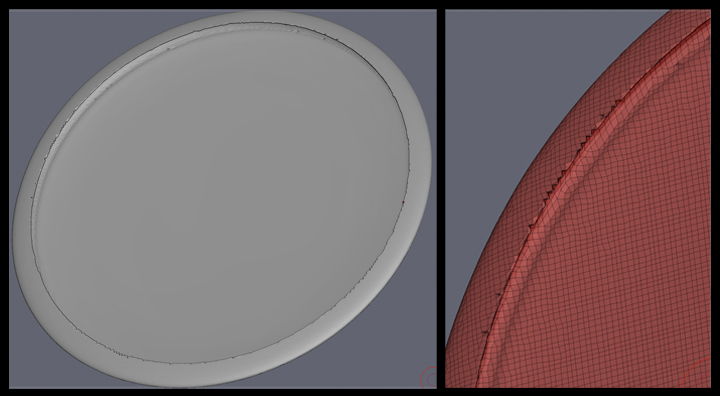
HI all. I’m having trouble cleaning up this edge.
Does anyone know how I can get rid of the jaggies on this curve and convert it into a crisp hard edge?
EdgeLoops perhaps?
O
Grouploops would be my first thing to try.
One approach I use for problems like this is to hide all of the geometry behind the edge in question, then use the slice circle brush with the center and square buttons active in the stroke icon box under the brush icon.

Carefully line up the brush to the opening on your model and create a fresh slice as close to the edge as you can without clipping any of the staggered polys. Once you have made an acceptable cut, click on the polygroup that was created by the slice you made. This will hide all of the good, and you are left with the bad bits you want to remove. Reverse visibility (control/shift/drag on canvas) and now you should have all the model you want to keep. Now all you need to do is go to Geometry/Modify Topology/Delete Hidden.You should now have a clean border edge with no jaggy polygons. Hope it helps.
ok to get a nice crisp circle if it is an opening then you could try to hide the back of the “plate” using the Select Rec brush using the Shift+CTRL so just the opening and jagged edges are visible or the top part that you want to fix.
Using the Clip Circle center brush and drag out a circle in the center of your mesh. Drag out using the Shift+CTRL keys position holding the space bar after it is drawn and without letting go of the Shift+CTRL key once positioned let go of the Space bar and hit the Alt key it will go from a white to a dark grey circle now let go of the keys.
Now bring back the rest of the mesh by respecting the select rec brush again. When you are ready you can use the ZReMesher to make better topology.
I have a tutorial I made a while ago for shadowbox but if you scroll the movie to about 16:20 into it almost the end I show this exact thing.
Hope this helps. Good luck to you
Wow - it’s funny, I had figured out how to do exactly what all of you suggested just before receiving your advice.
I wasn’t sure if I was making the correct moves or not, so it’s great to find out that I was on the right path.
Thank you Cryrid, Carver and Seavannah for your generous coaching and kindness to a noobie.
I visited everyone’s galleries and was thoroughly blown away!
I see that I clearly have a loooong way to go…